




Many GTM teams treat hiring data as background noise. Used well, it can improve target account prioritization by showing which accounts are expanding teams, changing operations, or preparing for new initiatives.
More data, more tools, more signals. But campaigns still miss.
That happens when hiring signals are treated as proof of intent instead of one input in a broader account scoring model. A company hiring 10 people is not automatically ready to buy. A company hiring 3 RevOps roles in 14 days, mentioning Salesforce CPQ, and matching your ICP is a different story.
Multiple roles in one GTM department
Expansion, new region, or team buildout
Raise priority if ICP fit is strong and the roles are recent
RevOps, Sales Ops, or CRM Admin hiring
Process cleanup, routing changes, reporting work, or quote-to-cash updates
Map the role to likely workflow pain before outreach
JD mentions specific tools
Existing stack, migration work, or implementation gaps
Combine with technographic and engagement data
Senior role plus supporting roles
New initiative with leadership ownership
Treat as stronger than isolated junior hiring
Old evergreen role
Possible low signal or stale listing
Review before scoring; do not treat as active intent
What Hiring Signals Can and Cannot Tell You
Hiring data is useful because it points to change.
A SaaS company posting RevOps, Salesforce Admin, and Sales Operations roles may be cleaning up routing, forecasting, or quote-to-cash workflows. A team hiring data engineers and mentioning Snowflake, dbt, or Airflow may be expanding its data stack. A company opening a new region and hiring SDR managers may be scaling GTM coverage.
Those are clues, not conclusions.
Strong Hiring Signals vs. Weak Hiring Signals
Strong hiring signals usually have three traits: they are recent, tied to a meaningful business change, and specific enough to suggest a next action.
Weak signals are broader. A single administrative role, an evergreen job post, or a generic opening without department context should not push an account into Tier 1. It may help account research, but it should not carry the scoring model.
Hiring Signals Are Operational Intent, Not Proof of Budget
Hiring signals are closer to operational intent than buyer intent. They show that the account may be changing how it hires, sells, supports customers, manages data, or runs operations.
They do not prove budget exists. They do not prove a buying committee is active. They simply help answer a better question: is this account going through a change that makes outreach more relevant now?
For a broader view of how hiring activity fits alongside other market triggers, see Lev8's guide to buying signals.
How to Use Hiring Signals in a Target Account Prioritization Workflow
A signal is only useful if it changes action.
For target account prioritization, hiring data needs to move through a workflow: capture the job posting, normalize the account, classify the likely business change, score the signal, assign a tier, trigger the right sales play, and measure the result.
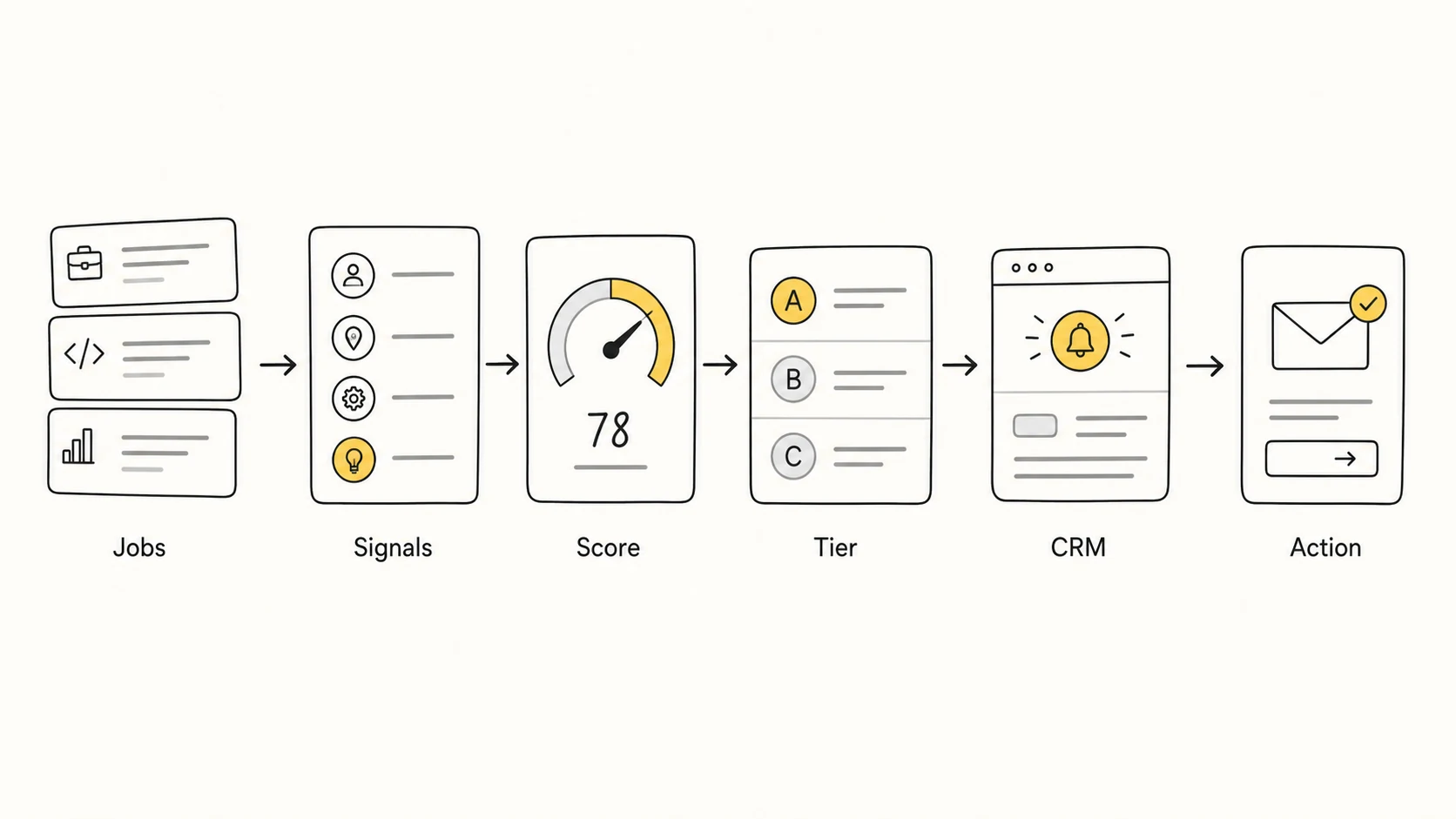
Capture Job Postings and Normalize the Account
Start by connecting each job posting to the right account. This sounds basic, but it is where many workflows break.
The same company may appear under multiple names, subsidiaries, regional entities, or acquired brands. If the account is not normalized, one company can become three records in the CRM, each with partial context.
Useful fields include company name, domain, location, department, role title, seniority, posting date, job description keywords, and mentioned tools.
Classify the Business Change Behind the Role
The next step is classification. Three SDR roles and three security engineering roles point to very different account motions.
Common hiring signal categories include:
- GTM expansion: SDR, AE, Sales Manager, Regional VP
- Revenue operations: RevOps, Sales Ops, CRM Admin
- Data stack expansion: Data Engineer, Analytics Engineer, BI Lead
- Compliance or security: Security Engineer, Compliance Manager
- Product acceleration: Product Manager, Engineering Manager, Platform Engineer
This classification keeps the model grounded. The question is not "who is hiring?" It is "what kind of change does this hiring suggest?"
Score, Tier, Alert, and Measure
Once the signal is classified, it can be scored and routed. A practical workflow looks like this:
job posting capture -> signal classification -> scoring -> Tier 1 / Tier 2 / Tier 3 -> CRM alert -> outreach angle -> measurement
Without this structure, hiring data becomes another dashboard. With it, sales teams get a clearer reason to act.
How to Score Hiring Signals Without Adding Noise
More data does not always mean better results.
A scoring model with 47 variables may look sophisticated, but it often becomes hard to explain, hard to maintain, and hard for sales teams to trust. Most teams are better off starting with 5 to 8 criteria.
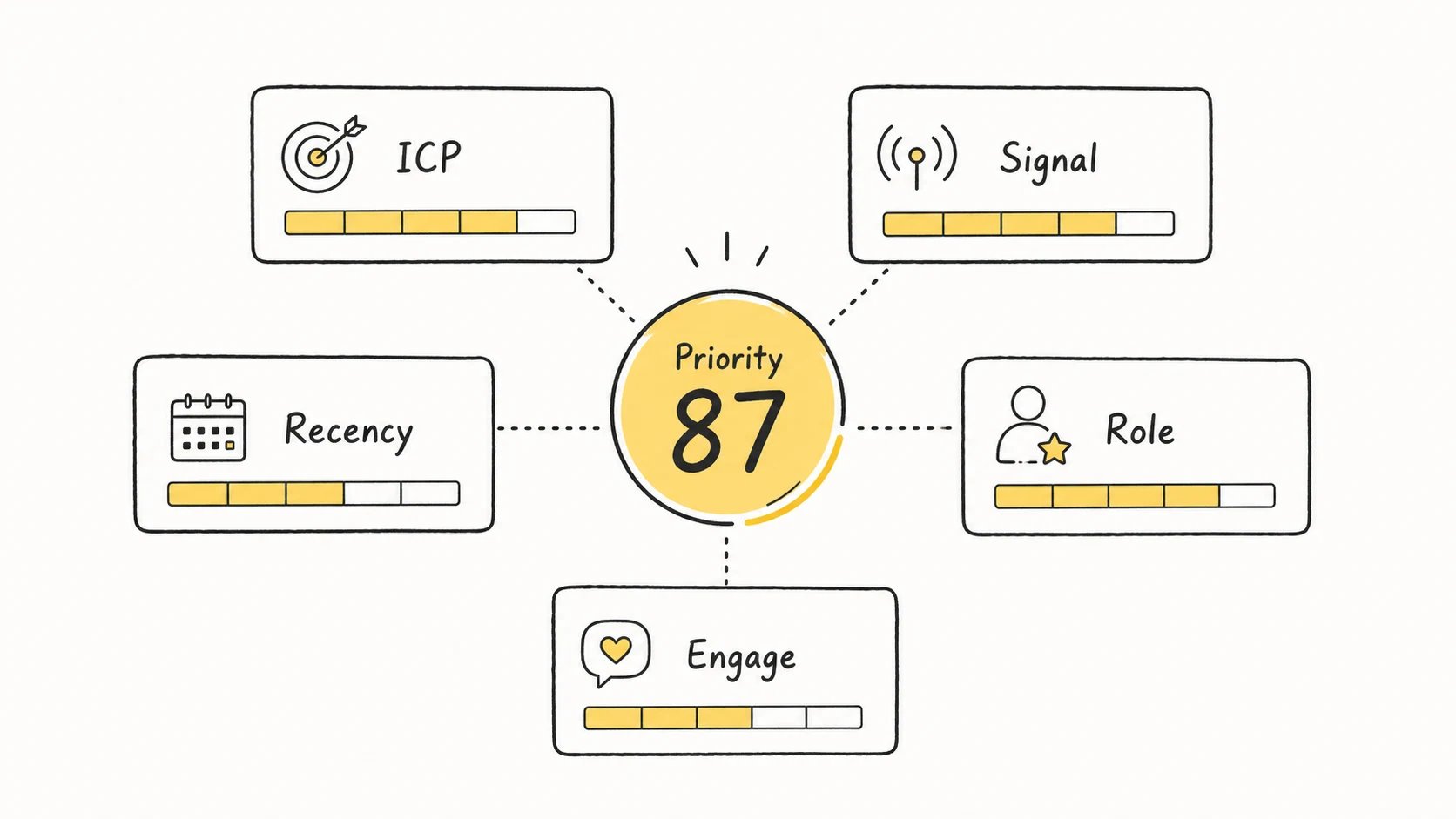
| Criteria | What to Measure | Example | Suggested Weight |
|---|---|---|---|
| ICP Fit | Industry, size, region, target segment | SaaS company, 200-1,000 employees | High |
| Signal Strength | Whether the role reflects business change | 3 RevOps roles in 14 days | High |
| Role Relevance | How closely the role maps to your solution | Salesforce Admin for CRM workflow | High |
| Recency | How recently the signal appeared | 0-7 days is strongest | High |
| Volume | Number of related roles | Multiple roles in one department | Medium |
| Tech Mention | Tools or platforms in the JD | HubSpot, Salesforce, Snowflake | Medium |
| Engagement | Account activity outside hiring | Product page view, content engagement | Medium |
Start With 5-8 Criteria, Not 47 Variables
A useful scoring model should explain why an account moved up or down. If the team cannot explain the score, the score will not drive behavior.
A simple test helps: if this signal is true, would we change priority, messaging, cadence, or owner assignment? If the answer is no, the signal probably does not belong in the core model.
Use Recency Decay Before Assigning Priority
Hiring signals age quickly. A role posted yesterday should not carry the same weight as a role that has been open for 90 days.
A basic decay model can work:
- 0-7 days: 100% weight
- 8-14 days: 75% weight
- 15-30 days: 50% weight
- 31-60 days: 25% weight
- 60+ days: review or remove from active scoring
This keeps stale hiring activity from distorting priority.
Combine Hiring Signal Strength With ICP Fit
Hiring activity matters most when the account already fits your market. A weak-fit company with heavy hiring may still be a poor use of sales time.
A simple formula can look like this:
Final Priority Score = (Hiring Signal Score x Recency Factor) x ICP Fit Multiplier + Engagement Score
The formula is not the point. The discipline is. Hiring signals should raise priority only when they support a clear account hypothesis.
How to Map Job Postings to Likely Business Needs
Hiring signals become useful when they turn into business assumptions.
A sales team should avoid saying, "We saw your job posting." That can feel intrusive. A better approach is to connect the hiring pattern to a common operational challenge.
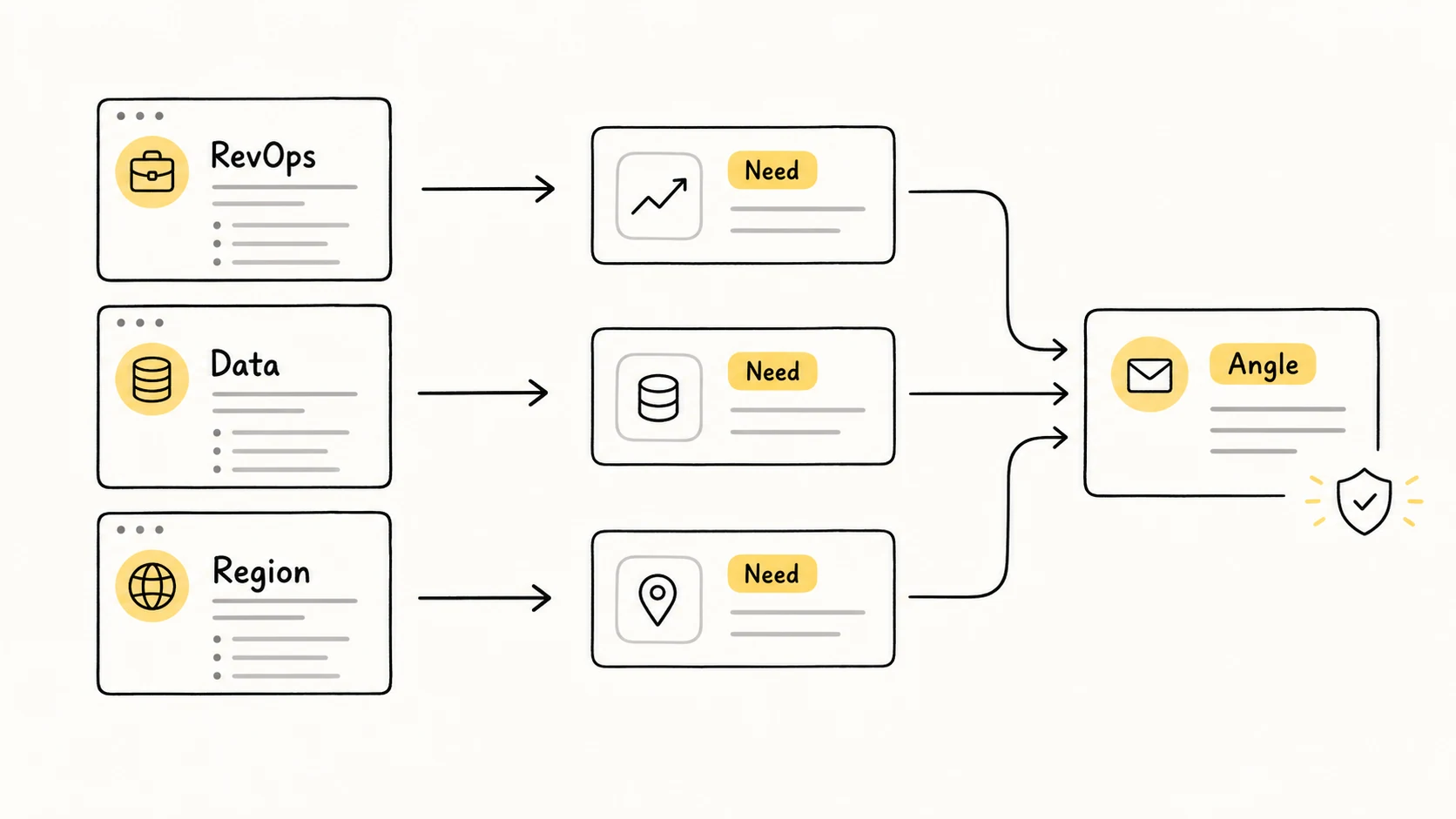
| Job posting signal | Possible business change | Safer outreach angle |
|---|---|---|
| Hiring RevOps Manager + Salesforce Admin | CRM cleanup, routing changes, reporting gaps | "Teams expanding RevOps often revisit routing, enrichment, and handoff rules." |
| Hiring 3 data engineers with Snowflake/dbt in JD | Data stack expansion or analytics modernization | "When data teams scale, GTM teams often need cleaner company and contact context." |
| Hiring SDR Manager in a new region | Regional GTM expansion | "New-region sales teams usually need account mapping and reliable local data." |
| Hiring compliance or security roles | Enterprise readiness, customer requirements, or regulatory pressure | "Teams moving upmarket often revisit vendor data quality and workflow controls." |
RevOps Hiring
If an account is hiring a RevOps Manager, Sales Operations Analyst, or Salesforce Admin, the team may be working on CRM hygiene, routing, reporting, forecasting, or quote-to-cash process.
A stronger outreach angle would focus on that operational moment: teams expanding RevOps often revisit enrichment, account routing, and handoff rules.
Data and Engineering Hiring
Job descriptions mentioning Snowflake, dbt, Airflow, Fivetran, or warehouse migration may point to data stack expansion.
This signal should still be checked against ICP fit and account activity. A team adding data roles may be modernizing infrastructure, but that does not always create an immediate GTM buying window.
Regional Sales Expansion
Hiring SDR managers, AEs, channel managers, or regional leaders in a new geography often suggests GTM expansion.
These accounts may deserve higher priority if the account fits your ICP. The sales angle should focus on regional coverage, account mapping, data quality, and pipeline creation rather than a generic product pitch.
Compliance or Security Hiring
Compliance, privacy, and security hiring can suggest enterprise pressure, customer requirements, or regulatory changes.
These signals are useful for account research, especially in enterprise sales. They should rarely trigger aggressive outbound on their own.
How to Operationalize Hiring Signals in CRM
Research that stays in a spreadsheet rarely changes sales behavior.
To make hiring signals operational, teams need CRM fields, alert logic, tier-specific plays, and regular review. The workflow should show why an account moved up and what the owner should do next.
Fields Your CRM Needs
Useful CRM fields include:
- Hiring Signal Type
- Role Count
- Department
- Seniority
- Posting Date
- Recency Bucket
- Mentioned Tools
- ICP Fit Score
- Priority Tier
- Recommended Next Action
- Owner
Not every field needs to be automated on day one. Start with the fields that help reps understand priority and act with context.
Tier 1, Tier 2, and Tier 3 Plays
Tier 1 accounts should have strong ICP fit, recent hiring activity, and a clear business hypothesis. These accounts deserve deeper research, more personalized outreach, and faster follow-up.
Tier 2 accounts may have strong ICP fit but weaker signals, or strong signals without enough engagement. These accounts are good candidates for light-touch outreach or nurture.
Tier 3 accounts fit the market but lack recent relevant signals. They should stay in the account universe, but not consume the team's highest-effort motions.
Alert Rules Sales Teams Will Actually Use
Alerts need restraint. Too many alerts will train reps to ignore all of them.
A useful alert might be: "In the last 14 days, this account added 2 or more relevant roles, and ICP Fit is above threshold."
A noisy alert would be: "Any new job post from any target account." That creates activity without judgment.
How to Measure Whether Your Prioritization Model Is Working
The score is not the outcome.
A hiring-signal model should be judged by sales behavior and pipeline results. If high-priority accounts do not produce better responses, meetings, or opportunities, the model needs adjustment.
Track metrics such as:
- Tier 1 accounts contacted
- Response rate
- Meetings booked
- Opportunity conversion
- Pipeline created
- Time-to-engage
- Revenue per rep
- Cost-to-serve
- False positive rate
The model may fail for several reasons. Signal weights may be wrong. ICP filters may be too broad. Sales plays may not match the signal. Measurement helps separate those issues instead of blaming the data source.
Before rolling the model out widely, check:
- Does every signal change a sales action, message, cadence, or owner assignment?
- Is recency built into the score?
- Can reps explain why an account is Tier 1?
- Are stale job postings reviewed or removed?
- Are CRM alerts limited to high-confidence changes?
- Are response, meeting, opportunity, and pipeline outcomes tracked by tier?
- Is the model reviewed at least monthly?
Common Mistakes When Using Hiring Signals
Treating Every Job Post as Buying Intent
A job post can mean expansion, backfill, brand visibility, or routine hiring. It does not automatically mean the account is in-market.
Raise priority only when the role connects to a business change, appears recently, matches your ICP, and supports a reasonable sales action.
Ignoring Recency
Old signals create false confidence. A 90-day-old posting should not influence today's account priority the same way as a role posted this week.
For sales timing, recency often matters more than raw signal count.
Writing Outreach That Feels Too Personal
Personalization works when it reflects a real moment or problem, not when it just proves you know someone's job title.
Hiring signals should be translated into business context. Mention the likely challenge, not the fact that you have been watching the hiring page.
Letting Dashboards Replace Judgment
Dashboards help teams see change, but they cannot decide what matters. A clean account view can still be full of weak assumptions.
The purpose of hiring-signal prioritization is filtering signal from noise, not adding another layer of reporting.
Conclusion
Hiring signals can improve target account prioritization when they are treated as structured inputs inside a broader account scoring model. They are most useful when combined with ICP fit, recency, role relevance, engagement, and a clear next action.
The practical path is straightforward: collect the right hiring signals, classify the business change, score with a small set of criteria, push priority into CRM, and measure whether the model improves sales outcomes.
If your team wants to monitor hiring signals continuously and keep account priority current, Lev8 can help turn account changes into a more actionable GTM workflow.
For related GTM reading, review how teams compare Clay alternatives for GTM workflows, evaluate Claude Opus 4.7 for agentic coding, find the first 10 customers, understand the GL Ventures investment, rethink why GTM moves too fast, combine PLG with outbound, reduce DeepSearch hallucinations, and explore customer success playbooks.