




In this Apollo vs Clay comparison, both platforms can help B2B teams find prospects, enrich contact data, research accounts, and run outbound campaigns.
But they are not the same type of product, and they are not built for exactly the same operating model.
Apollo is primarily an all-in-one sales intelligence and engagement platform. Your team can search for contacts, enrich records, build lists, create workflows, and run outreach inside one product.
Clay is primarily a configurable data enrichment and workflow orchestration platform. It lets your team combine providers, research accounts with AI, apply custom qualification rules, and send the results into your CRM, audience, sequencer, or another sales tool.
Choose Apollo when you want your sales team to start prospecting quickly. Choose Clay when you have a specific reason to build a more customized prospecting workflow.
The better option depends less on which platform has more features and more on how much setup, workflow ownership, and customization your team is prepared to manage.
Quick Answer: Apollo or Clay?
Choose Apollo when you want contact data, list building, enrichment, workflows, and outbound in one platform—and you want the sales team to start quickly without designing the entire system first.
Choose Clay when one database or a standard set of filters is not enough, and someone on your team can build and maintain custom data, research, and enrichment workflows.
Apollo gives your team more of the sales process out of the box. Clay gives your team more control over how that process works.
Consider Lev8 when the bigger problem is no longer building a list, but deciding which accounts deserve attention now, why the timing matters, and what message angle to use.
Table 1
Apollo vs. Clay: Quick Decision Matrix
| Evaluation Decision criterion | Apollo Ready-to-use sales platform | Clay Configurable workflow platform |
|---|---|---|
| Can sales reps use it directly? | Usually, with less workflow setup | Often requires more initial configuration |
| Native company and contact search? | Yes | Search, imports, CRM data, Audiences, and connected providers |
| Can it run outbound? | Yes, inside the platform | Yes, through Clay Sequencer or integrations |
| Can it combine several data providers? | Available in selected enrichment flows | A central part of the product |
| Who is likely to maintain it? | Sales, founders, or RevOps | Founders, growth operators, RevOps, or GTM Ops |
| Best for | Teams that want a quicker starting point | Teams that need a custom workflow |
Use this matrix as a starting point. The best fit still depends on workflow ownership, data requirements, and the sales process your team is prepared to operate.
How we compared them: This guide focuses on the practical buying decision: what each platform helps your team do, how much setup it requires, what causes costs to grow, and whether Clay can replace Apollo. Product and pricing information was checked against official materials in July 2026.
01. Apollo and Clay Are Built for Different Teams
Apollo and Clay increasingly overlap. Both now offer enrichment, AI research, signals, automation, and outbound capabilities. But an Apollo vs Clay features comparison is most useful when the products are placed in the right categories: Apollo is primarily an all-in-one sales intelligence and engagement platform, while Clay is a flexible data enrichment and workflow orchestration platform.
It is how your team is expected to use the product.
Apollo gives your sales team a more complete starting point
Apollo begins with its own company and contact database.
A sales representative can search for people and companies, filter the results, reveal or enrich contact information, save prospects to a list, and add them to a sequence without first connecting several outside data providers.
In the Apollo interface reviewed for this article, the save-contact flow brings together email and phone enrichment, verification status, estimated credit usage, list enrollment, and sequence enrollment.
Find a prospect → enrich the record → save it → start outreach
Apollo is not limited to database search and email sequences. Its Workflow Engine supports multi-branch and conditional workflows, manual reviews, tasks, notifications, and ready-made templates.
The product interface also shows workflow templates built around common events, including ICP-matched prospects, website visitors, job changes, missing contact data, CRM updates, and intent-related activity.
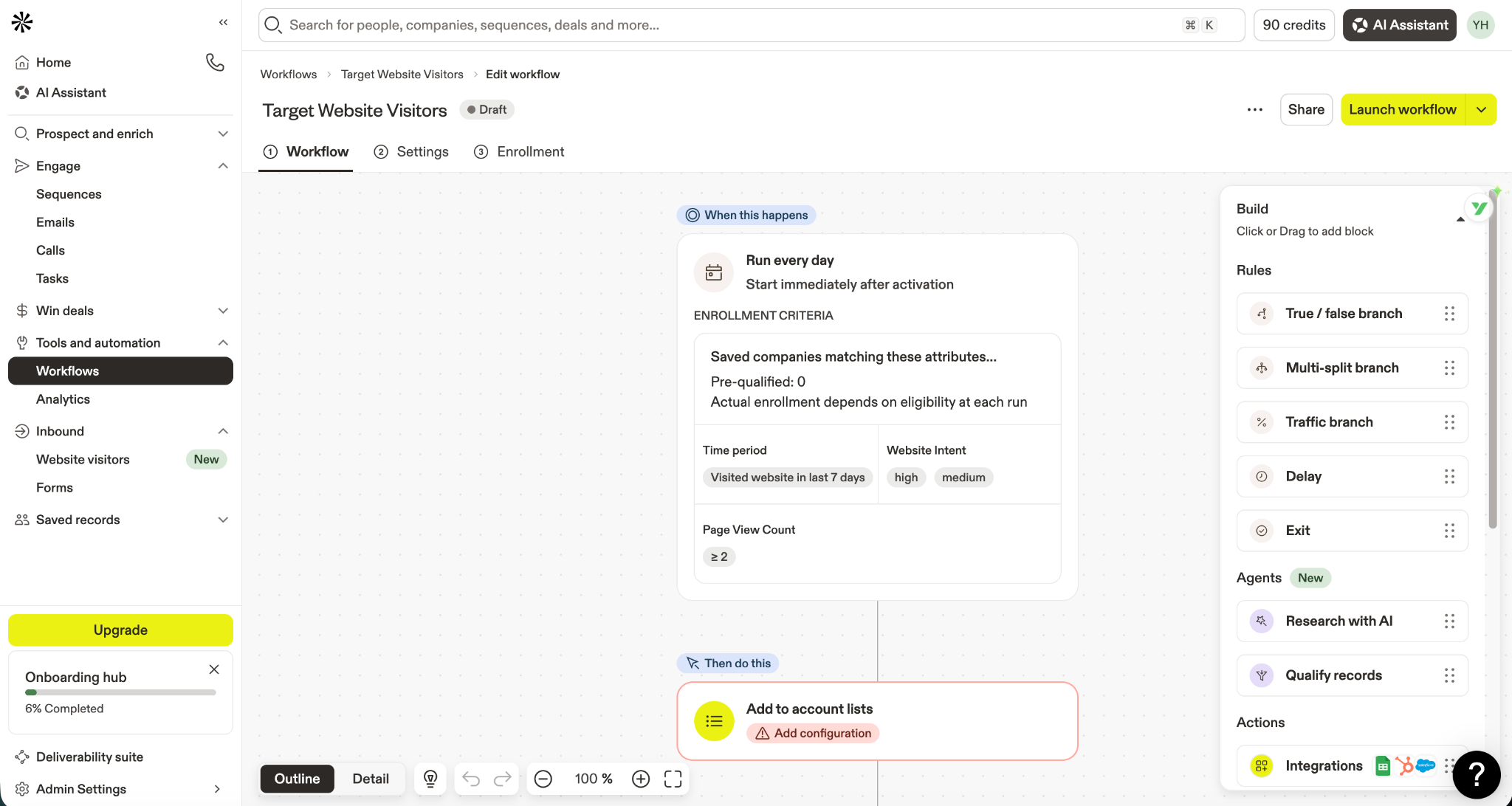
Apollo connects website activity and intent conditions with qualification, list enrollment, and subsequent sales actions. Screenshot supplied for this review.
In other words, Apollo does not only provide contact data. It gives sellers a place to find prospects, respond to selected events, and take action.
Clay gives your team more control over how the workflow is built
Clay can start with a broader range of inputs: company lists, CRM records, website URLs, internal ICP documents, first-party data, public web sources, and external providers.
Claygent can research the web, work with first- and third-party data, orchestrate workflows, and produce outputs for GTM plays.
Clay also lets teams search several providers in sequence. One provider may look for an email first; another is called only when the first one returns no valid result. Similar waterfalls can be used for mobile numbers, technology stacks, job openings, and other data points.
That creates more control, but it also creates more decisions: which provider runs first, which records deserve more enrichment, what the AI should research, what counts as qualified, where the data should go, and who maintains the workflow.
Apollo gives your sales team a prospecting system to work inside. Clay lets your team build a prospecting workflow around its own process.
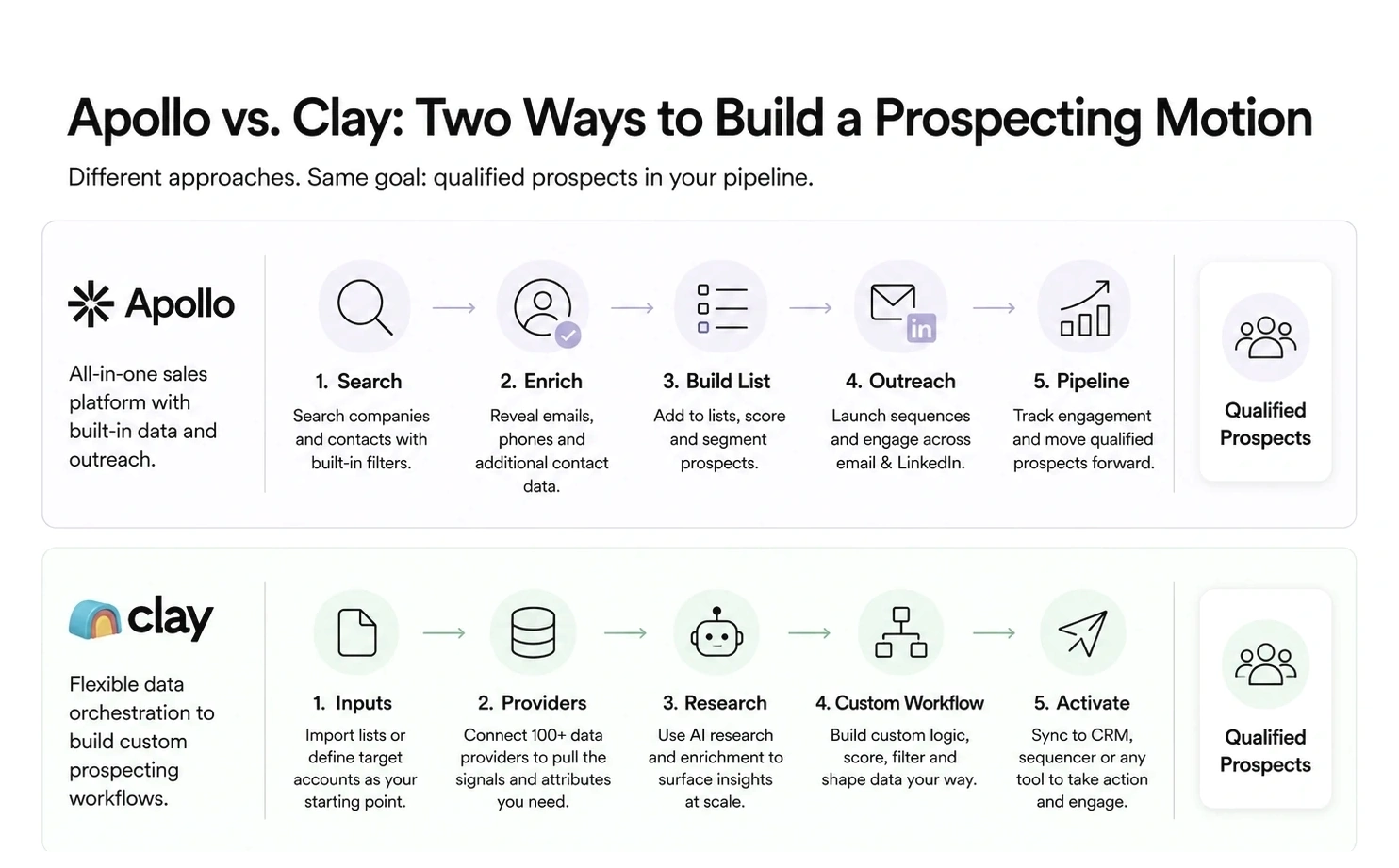
Figure 1. Apollo offers a streamlined, integrated path from search to outreach, while Clay supports a flexible workflow built around custom inputs, enrichment, research, and activation.
02. Choose Apollo If You Want a Ready-to-Use Sales Workflow
Apollo is the more straightforward choice when your team needs to find prospects and start outreach without first building a data workflow.
Your sales team will operate the platform directly
Apollo keeps contact search, company data, lists, enrichment, workflows, sequences, calls, and tasks close together. That matters when founders, SDRs, account executives, or sales managers will use the product day to day.
The team still needs to define its ICP, messaging, and qualification criteria. But it does not need to choose and connect every data source before sellers can begin.
You want fewer decisions before launch
Apollo provides workflow templates for common prospecting scenarios. Its Workflow Engine supports conditional paths, multiple branches, manual review, tasks, and notifications—not only simple linear automations.
For a smaller team, the advantage is not merely more automation. It is having fewer infrastructure decisions to make before the sales motion can start.
You want data and outbound in one platform
Apollo is designed to keep more of the standard workflow in one environment:
Search → list → enrichment → workflow → sequence → follow-up
A team may still use a separate CRM, validation service, deliverability system, or engagement platform. But for a smaller business, starting with one main prospecting platform may be easier to manage than assembling several tools at the beginning.
Apollo is likely the better fit when sales representatives will operate the tool, the workflow is relatively standard, and speed matters more than provider-level customization.
03. Choose Clay If You Need a Custom Prospecting Workflow
Clay becomes more valuable when a standard database and standard filters cannot express how your team identifies a good prospect.
One data source is not enough
Data coverage varies across regions, industries, company sizes, job roles, and data types. Clay allows teams to search multiple providers sequentially instead of depending on one primary source.
This may be useful when your team sells into several countries, niche industries, regional SMBs, specialist job functions, or markets where a single database produces inconsistent coverage.
You need more than standard company filters
Your definition of a qualified account may include recent hiring, a leadership change, technology usage, company news, CRM history, product activity, website behavior, or the answer to a custom research question.
Clay lets teams combine these inputs, run Claygent research, apply qualification logic, and send the output to a CRM, audience, sequencer, or another system.
Someone can maintain the workflow
Clay’s flexibility creates value only when someone takes responsibility for providers, enrichment order, AI prompts, qualification rules, usage budgets, CRM fields, failed automations, and the handoff to sales.
Clay does not necessarily require a full-time administrator. But as more providers, AI research steps, conditions, and integrations are added, clear ownership becomes increasingly important.
Clay is likely the better fit when your prospecting logic is genuinely different, several data sources need to work together, and someone can own the setup and maintenance.
04. Apollo vs Clay Pricing: What Will You Actually Pay For?
Apollo vs Clay pricing is difficult to compare through base-plan prices alone. Both platforms use credits, but the subscription price is only the entry point. The real cost is shaped by seats, data usage, external tools, and the operating effort required to produce a usable prospect.
Instead of asking which monthly plan looks cheaper, ask: What will cause our total cost to grow?
Apollo
Plan and user seats
- contact credits
- mobile and premium data
- exports to other systems
- tools Apollo does not replace
Apollo’s cost is likely to grow when more salespeople need seats, the team needs more contact data, more records are enriched, or contacts are regularly exported.
Clay
Plan
- Data Credits
- Actions
- AI research
- external providers
- workflow maintenance
Clay’s cost is likely to grow when more records enter the workflow, every record calls several providers, AI research runs at scale, or more systems are connected.
Apollo: platform access, seats, and contact data
Apollo’s cost typically starts with the plan and the number of users who need access. It can then increase with contact credits, email and phone reveals, enrichment volume, exports, and any external sequencer, dialer, validation, or deliverability tools the team still needs.
Apollo’s trial currently includes general and mobile credits. Additional credits can be purchased, and exports to external systems may consume export credits.
In the product interface reviewed for this article, enriching and saving one verified email showed an estimate of one credit. That is one workflow example, not a universal rate.
Clay: data, Actions, AI, and workflow ownership
Clay separates usage into Data Credits, which pay for data purchased through its marketplace, and Actions, which measure the workflow work Clay performs. Teams using their own provider keys may avoid Clay Data Credit charges for that provider, but the provider may still bill separately and the workflow still consumes Actions.
Costs can also rise when more records enter the system, several providers run for each record, AI research operates at scale, more destinations are connected, or custom workflows require regular troubleshooting and maintenance.
That last cost does not appear on the invoice: the time someone spends building, checking, and maintaining the workflow.
Which is cheaper?
Neither platform is automatically cheaper. Apollo can become costly when several salespeople need seats and consume or export large volumes of contact data. Clay can become costly when every record triggers multiple providers, AI tasks, workflow Actions, and ongoing maintenance.
The cheaper platform is not necessarily the one with the lower subscription price. Compare the cost per usable prospect and the operating effort required to produce it.
How much does it cost to produce one accurate, relevant prospect that a salesperson can actually act on?
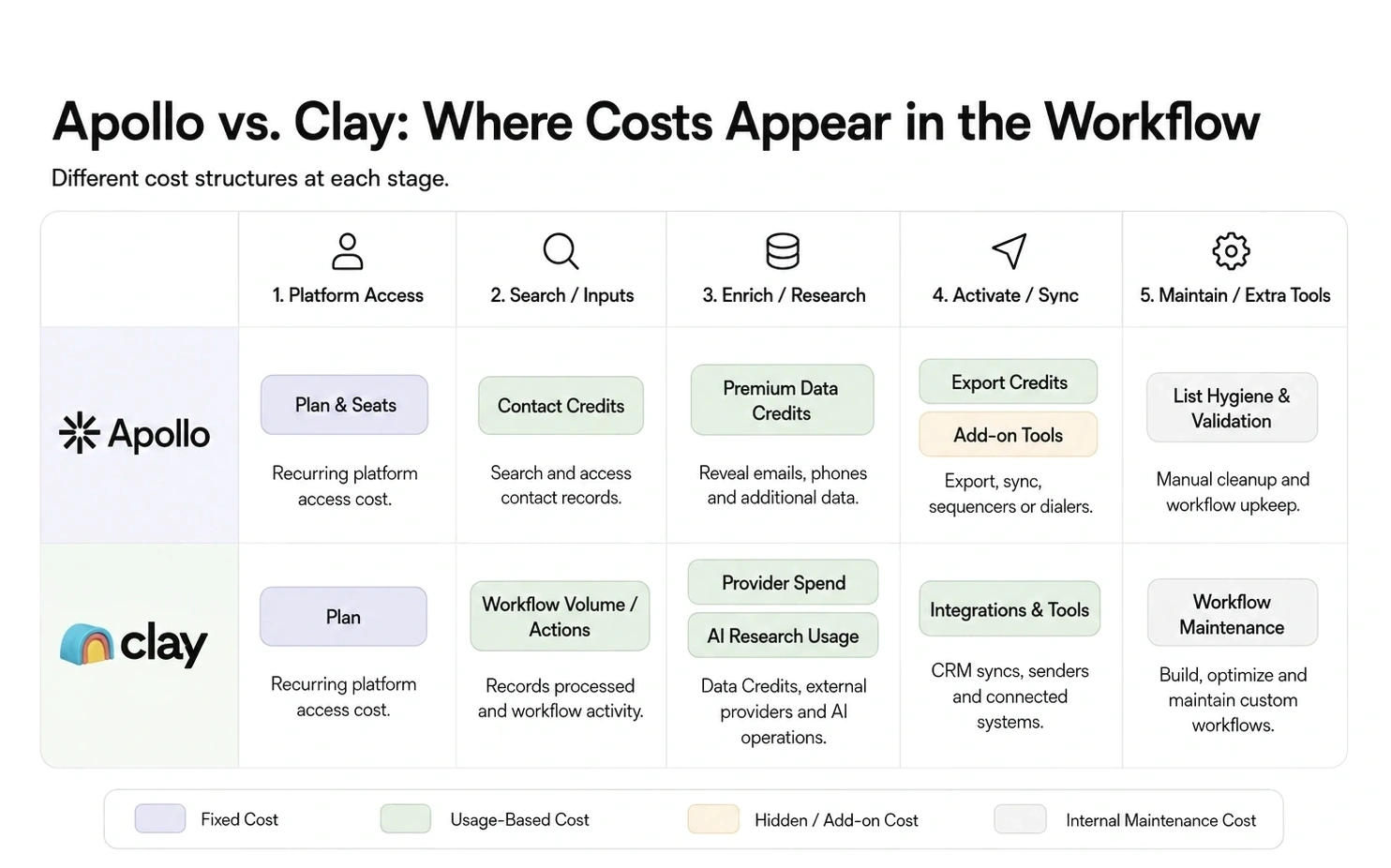
Figure 2. Apollo’s costs scale mainly with seats and contact-data usage; Clay’s costs grow with workflow volume, provider calls, AI usage, and maintenance complexity.
05. Can Clay Replace Apollo—or Should You Use Both?
Clay can replace parts of Apollo, but it is not automatically a one-to-one replacement. The answer depends on what your team currently uses Apollo for.
Apollo only
Apollo may be sufficient when your team mainly needs a native contact database, search and list building, email and phone enrichment, ready-made workflows, website visitor follow-up, sequences, and seller activity in one platform. This is the simpler choice when speed to launch matters more than provider-level customization.
Clay only
Clay can now cover more than data enrichment. Its current product includes multi-provider waterfalls, Claygent research, search and Audiences, signals, a native email sequencer, and several integration options.
A Clay-only setup is more realistic when your team already has a clear sourcing strategy, needs custom research or qualification, and has an operator who can manage providers, tables, routing logic, and workflow maintenance. It works best when Clay Sequencer or an existing sales execution tool already covers outreach.
Apollo and Clay together
One possible setup is Apollo for contact discovery and seller activity plus Clay for advanced enrichment, research, and routing.
The combined stack is justified only when Clay adds a clear layer of data quality, research depth, or workflow control that Apollo does not provide adequately. Otherwise, the team may simply inherit two subscriptions, two credit systems, overlapping records, more CRM synchronization, unclear field ownership, and additional maintenance.
- What does Clay add that Apollo does not provide adequately?
- Which platform is the source of truth?
- Where will sales representatives work?
- Who maintains the connection?
- How much additional value does the second tool create?
Use both only when the additional data quality or workflow control is worth the extra cost and complexity.
Final Verdict: Apollo or Clay?
The Apollo vs Clay decision depends less on feature count and more on how your team wants to operate. Choose Apollo when you want your sales team to find prospects and run outbound inside one more ready-to-use platform.
Choose Clay when you need greater control over data providers, enrichment, AI research, and workflow design—and someone on your team can operate that system.
Use both only when you can clearly explain what each platform owns.
For many smaller B2B teams, Apollo is the safer starting point because it asks the team to make fewer infrastructure decisions before prospecting begins. Clay becomes more valuable when the team has outgrown a standard database-led workflow or has a clear business reason to build something more customized.
Both platforms mainly help teams access, enrich, organize, and act on prospect data. But more data does not automatically tell a team which accounts are entering a real buying window.
There is no universal winner. There is only a platform that better matches the sales process your team is prepared to run.
What’s Next
Before replacing a tool, identify what is actually slowing the team down: finding contacts, improving data coverage, researching accounts, building workflows, running outbound, or deciding which accounts deserve attention now.
The last problem is different from database access or enrichment. It requires better timing, account context, and a clearer reason for sales to act.
Lev8 becomes relevant when the bottleneck is no longer building a larger list, but deciding who to prioritize, why now, and what to say next.
From signals to action
Turn live signals into qualified prospecting motions.
Lev8 helps your team understand who to prioritize, why the timing matters, and what to say next.
Sign up to get 300 free credits per monthly cycle. No credit card required.