



Bad outbound lists rarely look bad in the spreadsheet.
The names look real. The emails pass a basic check. The CRM fields are filled. Then the first campaign goes out, and the team finds the mess: bounced emails, dead numbers, outdated titles, missing consent, duplicate records, and contacts who never belonged in the sequence.
A practical contact verification checklist is not just an email check. For outbound teams, it is the launch gate that decides whether a contact is real, reachable, relevant, compliant, and ready for sales outreach.
Most Bad Outbound Lists Look Clean at First
The dangerous records are not always obvious.
A contact can have a valid email and still be useless for outbound. The person may have changed jobs. The title may be too junior. The phone number may be VoIP. The company may fit your keyword search but not your ICP. The CRM may show no opt-out, no consent source, and no last verified date.
That is where teams get trapped. They treat a green check from an email tool as proof that the contact is ready. It is not.
A verified outbound contact needs more than one working field. It needs enough evidence to answer one question: should this person enter a sequence, dialer, or sales workflow right now?
What a Contact Verification Checklist Should Actually Verify
A format check is cheap. A bad campaign is not.
If your checklist only validates email syntax, it can tell you whether an address looks like an email. It cannot tell you whether the person still works at the company, whether the phone number belongs to them, or whether the record can be used without creating compliance risk.
A usable checklist should separate field validity, identity and reachability, and campaign readiness.
| Verification layer | What you verify | Failure risk | Pass condition |
|---|---|---|---|
| Syntax, domain, MX records, deliverability, catch-all status | Bounce risk, sender reputation damage | Confirmed or low-risk work email | |
| Phone | Active status, line type, carrier signal, official source match | Low connect rate, spoofing, bad-number routing | Usable number with a trusted source trail |
| Identity | Name, current employer, title, seniority, department | Reaching the wrong person | Current role matches the target persona |
| Company | Domain, company name, ICP fit, segment, territory | Wrong account or poor fit | Account matches campaign criteria |
| Consent and suppression | DNC, opt-out, consent source, last contact date | Compliance risk and account trust damage | Clear permission status or suppressed record |
| CRM readiness | Dedupe, owner, source timestamp, last_verified_date | Stale data and rep-level guesswork | Complete, current, campaign-eligible record |
Field validity covers basics like email format, domain, MX record, phone format, and company website. Identity and reachability go deeper: current title, employment status, phone line type, deliverability risk, source confidence, and role relevance. Campaign readiness asks whether the contact can safely move into CRM, sequencing, dialing, or SDR review.
That last layer matters most.
Outbound teams get into trouble when they treat weak signals as proof. Caller ID is a weak signal. A phone lookup is a weak signal. A database match is a weak signal. Even a deliverable email can be the wrong door.
The Outbound Contact Verification Workflow
Verification should happen before the campaign breaks.
A healthy workflow looks like this:
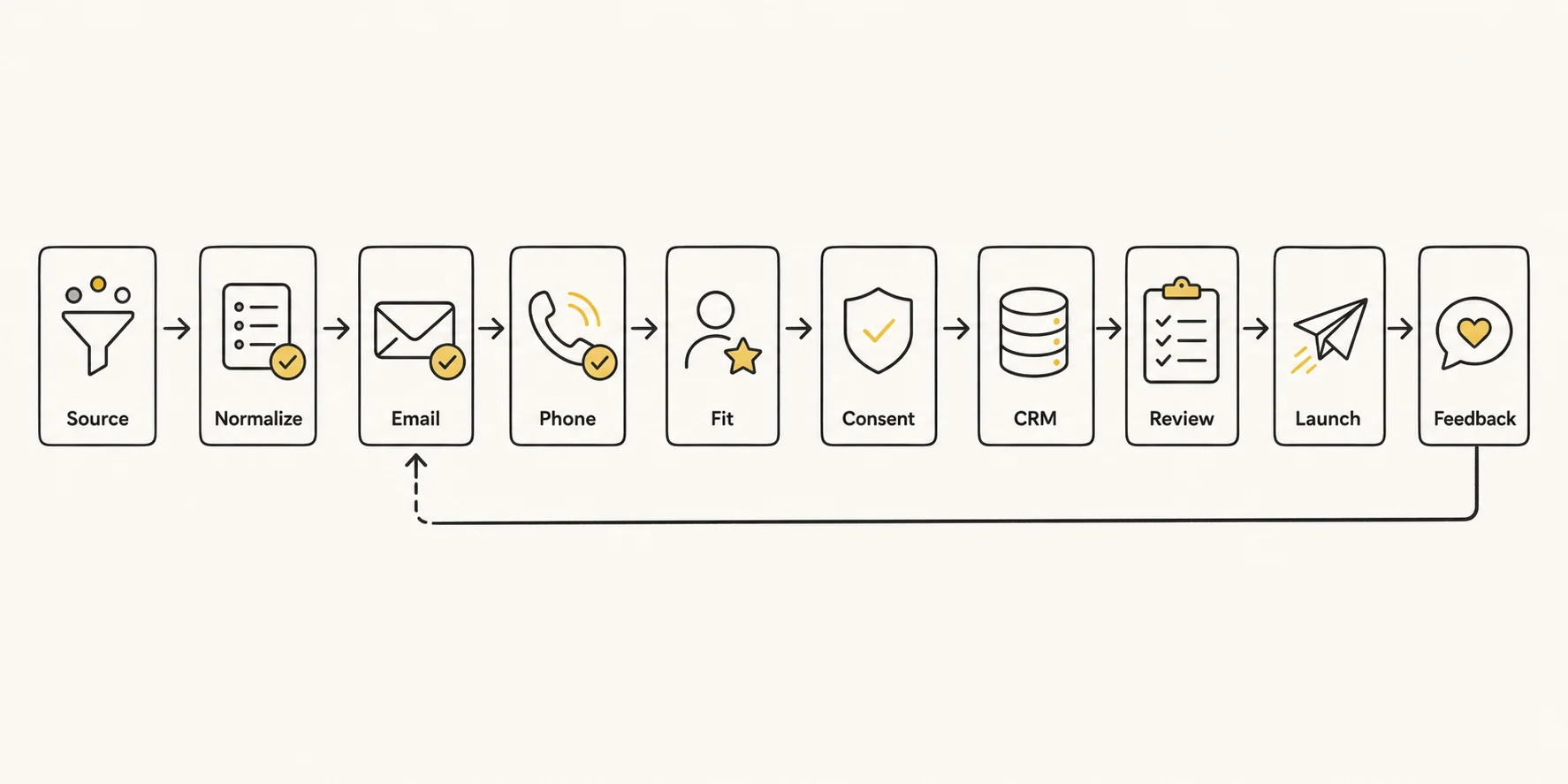
| Stage | What happens | Gate decision |
|---|---|---|
| Source | Import leads from a list, form, database, event, or account research workflow | Is the source allowed and relevant? |
| Normalize | Standardize names, domains, countries, phone formats, and CRM fields | Can this record be compared cleanly? |
| Check syntax, domain, MX, deliverability, and catch-all status | Send, review, or suppress? | |
| Phone | Check active status, line type, source match, consent, and number risk | Dial, review, or suppress? |
| Fit | Confirm person, company, ICP, role, seniority, and buying relevance | Does this contact belong in this campaign? |
| Consent | Check DNC, opt-out, consent source, territory rules, and documentation | Is outreach allowed under your rules? |
| CRM | Dedupe, assign owner, add source timestamp, and write last_verified_date | Is the record ready for sync? |
| Review | Route risky or inconclusive records to SDR or RevOps review | Who decides the edge case? |
| Launch | Enroll only valid contacts in sequence or dialer | Is the campaign ready? |
| Feedback | Feed bounce, reply, connect, opt-out, and bad-number signals back into the record | What should change before the next launch? |
The point is not to add more tools. The point is to give every contact a status.
Valid contacts can move forward. Invalid contacts should be removed, updated, or suppressed. Risky contacts need a lower-risk path. Inconclusive contacts should go to review, especially before high-volume outbound.
This is where many teams lose control. A record comes back as unknown, catch-all, recently changed, or conflicting across sources. Instead of routing it to review, the system quietly treats it as usable.
That is how CRM pollution starts.
The Outbound Contact Verification Checklist
A checklist is only useful if it changes behavior.
The fields below are not meant to create busywork. They help your team decide whether a contact should pass, pause, suppress, or route to a human.
Email syntax and domain
Removes obvious invalid addresses
RevOps
Email verifier, DNS lookup
Fail malformed emails and dead domains
MX and deliverability status
Protects sender reputation
RevOps
Email verification tool
Pass confirmed or low-risk work emails
Catch-all status
Prevents unknown risk from entering high-volume campaigns
RevOps
Email verifier
Route catch-all to review or low-risk sequence
Temporary or role-based email
Avoids poor personalization and low-quality contacts
SDR / RevOps
Email verifier, CRM
Suppress disposable, generic, or role inboxes unless explicitly needed
Active phone status
Reduces bad-number dialing
RevOps
Phone validation, telecom data
Suppress inactive or unreachable numbers
Line type and VoIP flag
Helps route mobile, landline, VoIP, and unknown numbers differently
RevOps
Phone validation provider
Mark VoIP and unknown line types as risky
Caller ID and source match
Prevents weak phone signals from being treated as proof
SDR
Company website, CRM history, trusted public source
Do not pass on caller ID alone
Current employer
Avoids contacting people who changed jobs
SDR
LinkedIn, company website, enrichment source
Pass only if current employer matches the account
Title and seniority
Confirms buying-role relevance
SDR / Sales Manager
LinkedIn, website, CRM, enrichment source
Route unclear or recently changed titles to review
Company ICP fit
Prevents better-looking bad-fit records
Sales Manager / RevOps
CRM, account research, enrichment source
Suppress accounts outside campaign criteria
DNC, opt-out, and consent
Reduces compliance and trust risk
Compliance / RevOps
CRM, suppression list, consent records
Suppress missing or negative permission states under your policy
Duplicate record check
Stops suppressed records from re-entering through another object
RevOps
CRM dedupe rules
Merge or suppress duplicates before launch
Source timestamp
Shows whether the data is recent enough to trust
RevOps
CRM, enrichment logs
Review records without a recent source timestamp
last_verified_date
Prevents old contacts from resurfacing as new
RevOps
CRM required field
No last_verified_date, no enrollment
Campaign eligibility
Confirms the final launch decision
Sales Manager
CRM status, sequence rules
Only valid, documented records enter outbound
Email Verification
Email verification starts with syntax, but it should not end there.
Check the domain, MX records, temporary email risk, role-based addresses, catch-all status, and deliverability risk. A clean-looking address can still hurt sender reputation if the provider cannot confirm inbox-level reachability.
Catch-all domains deserve special treatment. They may accept mail for many addresses, which can hide invalid contacts until your campaign starts bouncing or underperforming. For core outbound sequences, a catch-all result should usually be marked risky rather than valid.
A reasonable pass rule: the email has valid syntax, the domain resolves, MX records exist, the address is not temporary or role-based, and the deliverability result is confirmed or low risk. Unknown and catch-all records should not auto-enter your main sequence. If you need a focused validation step before sequencing, use an email verifier before records move downstream.
Phone Verification
Phone numbers create false confidence fast.
Do not trust the incoming call display to be accurate. It is too easy to fake. A number can appear to belong to a company and still have no reliable link to the person you want to reach.
Your phone checklist should cover active status, line type, carrier or telecom signal, VoIP risk, official business source match, DNC or consent status, and caller ID reputation. For phone-heavy outbound, number reputation also becomes part of deliverability. A clean list will not save a dialer using numbers that prospects already see as suspicious.
VoIP needs a separate flag. Some will not work because they are VoIP, and some will work technically but still create trust or routing issues. A lookup result is useful, but it is not identity proof.
When the contact is high value, use an independent source. Find their number on the company's official website and use that, or compare against trusted CRM history and reliable public business profiles.
Person and Company Verification
A real person is not always the right person.
Person verification should confirm full name, current title, seniority, department, employment status, location, and buying-role relevance. Company verification should confirm domain, company name, industry, size, territory, ICP fit, account status, and recent business signals.
This is where keyword-based prospecting falls short. A title match can still miss the buying committee. A company can match your category but fail your segment. A contact can look senior enough but sit outside the actual workflow your product supports.
Tie the pass rule to your ICP. If the company fits but the role does not, route it to research. If the title changed within the last 90 days, verify the new responsibility before enrollment. If the company recently rebranded or merged, check the domain and CRM account relationship before syncing.
For deeper role mapping, pair this checklist with a workflow for finding verified decision makers or a broader guide on how to find decision makers from a company URL.
Compliance and Consent Screen
Compliance should not be a post-call cleanup task.
Before a contact enters outbound motion, check DNC status, opt-out history, consent source, territory restrictions, last contact date, suppression reason, and documentation. For phone-heavy motions, this screen needs to happen before dialer enrollment, not after an SDR notices a problem.
This is operational discipline, not legal advice. Your legal or compliance team should define the rules. RevOps needs to make those rules visible in the workflow. The FTC's guide to complying with the Telemarketing Sales Rule is a useful reference point for U.S. telemarketing and Do Not Call considerations.
A practical default: if a mobile number exists but consent status is missing, suppress it from the dialer until the status is confirmed. If an opt-out exists anywhere in the account or contact history, do not let a duplicate record bypass suppression.
CRM Readiness
A verified contact outside the CRM can still become bad data inside it.
Before sync, check duplicate records, required fields, source timestamp, last_verified_date, owner, lifecycle status, suppression status, campaign eligibility, and account match. Without these fields, the CRM becomes a storage layer for uncertainty.
One rule helps: no last_verified_date, no enrollment.
That may sound strict, but it prevents old records from resurfacing as "new" prospects. A nine-month-old VP Sales record may now belong to a different company, a different territory, or a different buying process. The CRM should preserve context, not erase it.
Pass, Suppress, or Review: How to Route Verification Results
The checklist should not end with a score.
Use four routing states:
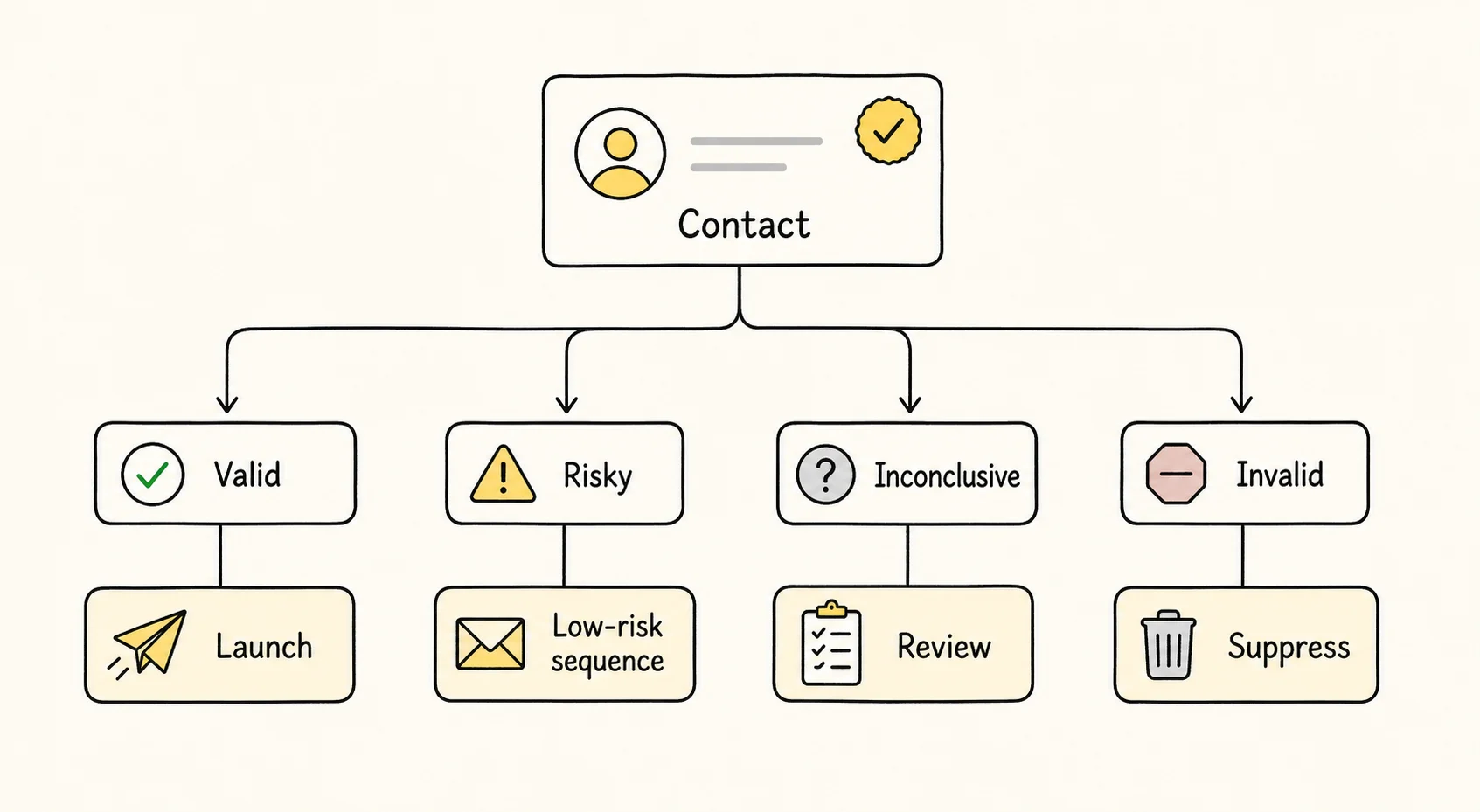
Valid: the contact has complete core fields, current identity evidence, reachable channels, clear compliance status, and a campaign-ready CRM record.
Invalid: the email is high-risk or undeliverable, the number is inactive, the person has left the company, the company is not a fit, or the record conflicts with suppression rules.
Risky: the email is catch-all, the number is VoIP, the title recently changed, the source is old, or the provider results conflict. Risky records may still be useful, but they need a lower-risk workflow.
Inconclusive: the data is incomplete or conflicting enough that there is no way to know for sure. These records should not enter high-volume outbound automatically.
Valid
Current RevOps leader, confirmed work email, documented consent status
Enroll in the right campaign
Risky
Catch-all email, VoIP phone, title changed recently
Use lower-risk sequencing or route to SDR review
Inconclusive
Two sources disagree on employer or title
Hold out of high-volume outbound until reviewed
Invalid
Left company, dead domain, inactive phone, opt-out present
Suppress, delete, or update before future use
This is a natural place for automation to help. For example, a structured waterfall enrichment workflow can combine multiple sources, identity validation, reachability scoring, and source trails into one reviewable record. The value is not replacing SDR judgment. The value is reserving human attention for the records where judgment actually matters.
Common Mistakes That Make Verified Contacts Unsafe to Use
The first mistake is treating email verification as contact verification. A deliverable email says one channel may work. It does not prove the person is relevant, reachable by phone, compliant to contact, or current in role.
Another common failure is trusting caller ID or online directories too much. Most teams know spoofing exists, but they still behave as if a matching display name is enough. It is not.
Old timestamps cause quieter damage. A record verified two quarters ago can slip into a new campaign because nobody asked whether it is still true. That is especially risky for startups, sales leadership roles, recruiting-heavy markets, and any account with recent funding, layoffs, or reorg signals.
Then there is the "unknown equals good enough" problem. Catch-all email? Send it. VoIP number? Dial it. Conflicting title? Let the SDR figure it out. That approach saves a few minutes before launch and burns hours after launch.
Tool cost can also mislead teams. Pricing is confusing in many verification products, especially when credits, minimum spend, repeated checks, and manual review are not counted together. The cheapest lookup is expensive if it fills your CRM with records nobody should touch.
When Automation Should Help, and When a Human Should Review
Automation is best for repeatable checks.
Use it for dedupe, field normalization, email verification, phone enrichment, source timestamping, last_verified_date updates, suppression checks, and CRM sync gates. Those steps need consistency more than opinion.
Human review belongs where the judgment is ambiguous: strategic accounts, conflicting sources, unusual titles, recent job changes, missing consent, high-value prospects, and contacts tied to complex buying committees.
The split should be clear. Machines handle the first pass. Humans handle the edge cases.
Lev8 FIND and BUILD fit into that middle layer: find qualified companies and people, enrich them through multiple sources, validate identity and reachability, and surface hidden signals such as role changes, tech-stack clues, hiring shifts, or company movement. Used well, the product supports the workflow instead of becoming the whole article.
How Often Should Outbound Teams Re-Verify Contacts?
No single cadence works for every team.
Old CRM lists should be re-verified before reactivation. High-volume email campaigns should refresh deliverability risk before launch. Phone-heavy outbound should confirm DNC, consent, line type, and number reputation before dialing. Fast-changing industries need tighter checks on title, company, and buying-role relevance.
A simple rule works better than a fixed calendar: re-verify when the contact is about to be used.
For many teams, that means a quarterly review for dormant CRM records, a pre-launch check for every campaign, and immediate updates after bounce, reply, connect, opt-out, or bad-number feedback. Verification is not a cleanup project. It is a launch gate.
Conclusion: Treat Verification as a Launch Gate, Not a Cleanup Task
A strong contact verification checklist does more than reduce bounce rates. It helps outbound teams decide whether a person is real, relevant, reachable, compliant, documented, and worth contacting now.
If verification only happens after a campaign fails, the team is always cleaning up damage. Move the gate earlier: before CRM sync, before sequence enrollment, before dialer launch, and before risky records become rep-level guesswork.
Build an outbound list that is verified before reps touch it. Lev8 helps teams find qualified companies and people, enrich contact records, validate reachability, and route clean CRM-ready contacts into review or outreach.