




Waterfall enrichment sounds smarter than a single data source until the bill lands.
That is usually when the real question shows up: where did the saving actually come from?
The answer is not “more providers.” More providers can help, but they can also turn into the same data reshuffled through different tools. A useful waterfall enrichment workflow turns B2B contact enrichment into a rules-based system: which records qualify, which fields matter, which provider runs first, when the workflow falls through, when it stops, and what gets written back to the CRM.
Treat it as a fallback system rather than a default process.
That one shift changes the whole workflow. You are no longer trying to enrich every row until it looks complete. You are trying to create usable records: verified emails, usable phone numbers, clean role data, source history, and enough confidence for sales or growth teams to act without guessing.
Waterfall Enrichment Is a Fallback System, Not a Default Process
The expensive version starts with a full list and sends every contact through every lookup.
It feels thorough. It is usually lazy.
If 5,000 contacts go into a workflow and only 2,000 are real ICP matches, the other 3,000 records can still come back with emails, phones, titles, and company details. They are just better-looking bad fits. Better enrichment does not fix bad targeting.
The more useful rule is: only enrich when it affects a decision.
That decision might be whether the contact enters a sequence, which rep owns the account, whether the account deserves phone enrichment, or whether the lead should be held until the email is verified.
Company is outside ICP
Skip
More data will not make it worth contacting
ICP fit is strong, role is unclear
Run role and seniority enrichment
Routing depends on the buying role
Work email exists but status is unknown
Run email verification
Bounce risk affects deliverability
Valid email exists, phone is optional
Skip phone lookup or reserve for high-value accounts
Phone data can be expensive
Record was enriched in the last 30 days
Check cache first
Duplicate lookups are where credits quietly disappear
This is also where intent thresholds matter. A hiring spike, recent funding event, tech change, or high-fit account should move before a cold, low-fit contact. Credits go fast when the workflow has no gate.
What Waterfall Enrichment Actually Does Behind the Scenes
A waterfall is sequential.
Provider A tries first. If it returns a strong result, the workflow stops for that field. If it returns no match, a low-confidence match, a catch-all email, or a missing phone number, the workflow falls through to the next provider.
Order matters more than just stacking sources.
1
Query the first provider
Is the required field present and trustworthy?
2
Verify the result
Is it valid, risky, catch-all, unknown, or invalid?
3
Fall through if needed
Is another lookup justified?
4
Stop on a reliable match
Has the workflow found enough to act?
5
Sync the record
What source, status, and timestamp should be saved?
Email and phone should usually have separate waterfalls. A provider that is strong for U.S. work emails may be weak for EU mobile numbers. A source that works for SaaS founders may be poor for operations leaders at industrial companies.
One big waterfall looks clean on paper. Field-level waterfalls perform better in practice.
Why Single-Source Enrichment Breaks at Scale
Single-source enrichment is not always wrong.
If one provider already gives 70-80% verified coverage in your exact market, adding three more providers may be paying a middleman for marginal lift. That happens more often than vendor pages admit.
The breakage starts when the market gets wider. Different regions, functions, seniority levels, and contact types expose different database gaps. One source may return decent emails but weak phone coverage. Another may be current on company data but stale on job titles. A third may only matter for a specific geography.
| Factor | Single-source enrichment | Waterfall enrichment |
|---|---|---|
| Coverage | Limited by one database | Can recover misses across sources |
| Cost | Predictable | Can creep up without stop rules |
| Accuracy | Easier to audit | Stronger when verification and source priority are configured |
| Phone coverage | Often inconsistent | Better with phone-specific fallback |
| Complexity | Low | Medium to high |
| CRM readiness | Basic field fill | Better with merge rules and source lineage |
The question is not whether another provider can return more fields. It is whether that provider returns usable data the earlier source could not find.
If not, the workflow is not improving. It is just getting heavier.
The Workflow: Filter, Enrich, Verify, Merge, Sync
A workflow diagram helps here because the hard part is the decision path.
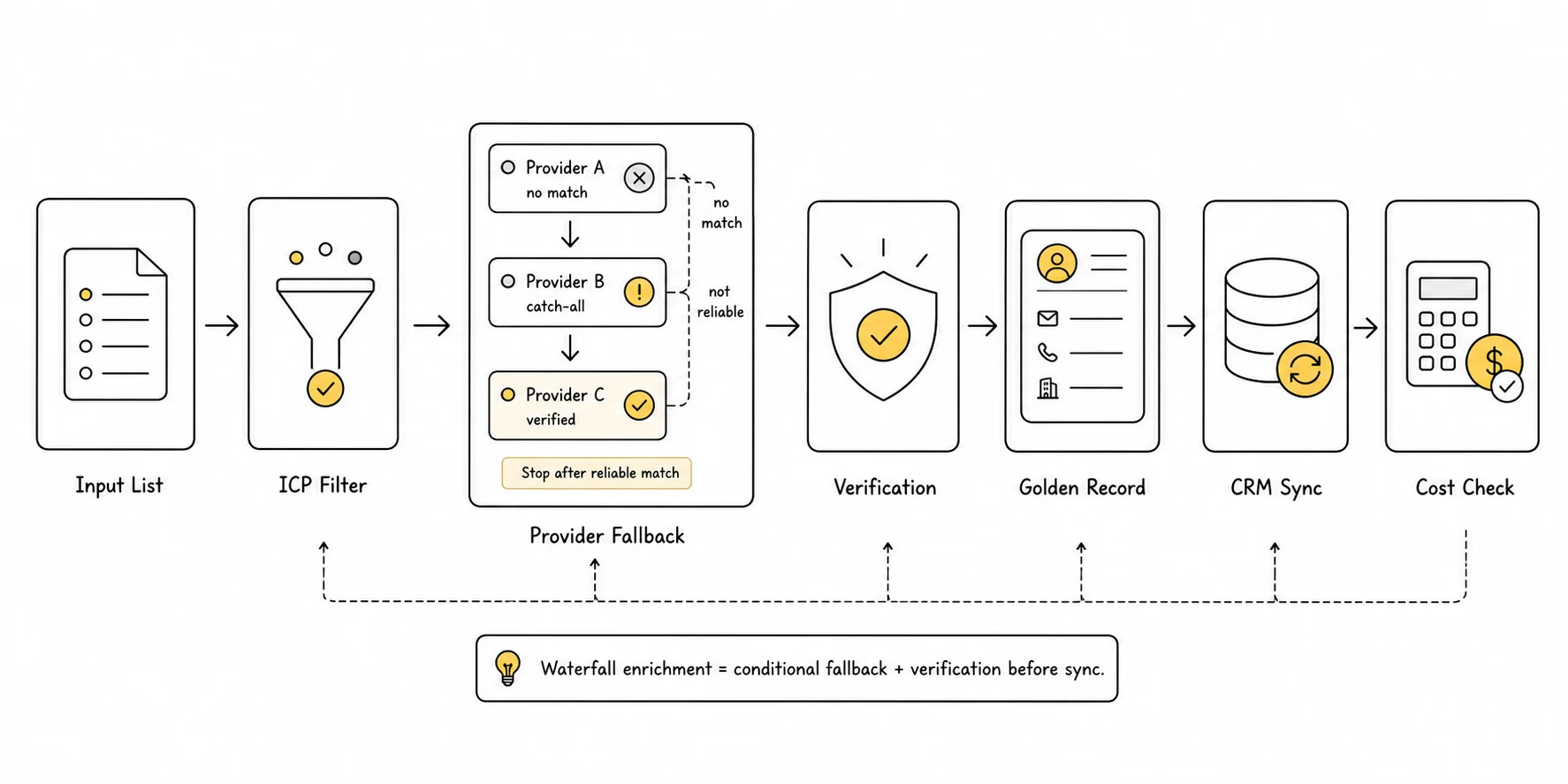
The simple version:
Input List
→ ICP / Intent Filter
→ Required Fields
→ Provider Order
→ Query + Fallback
→ Email / Phone Verification
→ Golden Record
→ CRM Sync
→ Monitor Cost per Usable Contact
The workflow should be easy to audit. If a rep asks why a contact entered a sequence, you should be able to see the source, verification status, timestamp, and rule that moved the record forward.
Black-box enrichment creates trust problems later.
Step 1: Filter Before You Enrich
Start with the list, not the providers.
The input should already have basic quality controls: company domain, person name or profile URL, country, target role, and enough account context to know whether the contact belongs in the workflow.
| Filter | Example |
|---|---|
| Company fit | Industry, company size, geography, funding stage |
| Role fit | Function, seniority, buying committee relevance |
| Intent or trigger | Hiring, tech change, expansion, funding, category research |
| Exclusion rules | Customers, competitors, unsupported regions, vendors |
| Minimum input quality | Company domain or LinkedIn URL required |
One practical cutoff: if the account would not be worth manual research, it probably should not receive expensive enrichment either.
For teams using Lev8, this is where FIND fits naturally. If you need to tighten the account and buying-role layer first, this guide on finding decision-makers from a company URL is the cleaner upstream step. Search wider, then qualify harder before the record reaches enrichment. The waterfall should receive filtered targets, not raw exports.
Step 2: Define the Fields That Actually Matter
Wall-to-wall fields are seductive.
They also blur the workflow. A founder-led motion may only need a verified work email, seniority, company context, and a trigger. An enterprise SDR team may need mobile numbers, department, region, CRM owner, and buying committee role.
Those are different workflows.
| Field type | Required | Optional | Usually skip |
|---|---|---|---|
| Identity | Full name, LinkedIn URL | Profile photo | Personal social handles |
| Company | Domain, company name | Size, industry, location | Generic company descriptions |
| Contact | Verified work email | Mobile or direct dial | Unverified personal email |
| Role | Title, seniority, function | Department | Keyword-only title guesses |
| Routing | Territory, CRM owner | Segment tag | Notes without source |
| Context | Tech stack, hiring signal | Funding event | Stale news snippets |
Phone enrichment is a good example. If phone outreach only happens for enterprise accounts, running phone lookups on every SMB contact burns budget without changing execution.
Fields should follow the sales motion, not the other way around.
Step 3: Score Providers Before You Build the Waterfall
Provider order should come from evidence, not habit.
Run a small batch first. Check fill rate, valid rate, catch-all rate, cost per usable contact, and overlap between providers. Sometimes one source already covers most of what you need. Sometimes Provider B looks good until you realize it returns many of the same records Provider A already found.
| Criteria | What to check | Score 1-5 |
|---|---|---|
| Field strength | Email, mobile, direct dial, firmographics, tech stack | |
| Geo coverage | U.S., Europe, APAC, local markets | |
| Segment fit | SaaS, manufacturing, healthcare, agencies, enterprise | |
| Cost per lookup | Credit or API cost before verification | |
| Cost per usable contact | Cost after invalid, catch-all, and duplicate records | |
| Verification quality | Native verification, confidence score, source freshness | |
| Latency | Real-time, batch, delayed | |
| API reliability | Rate limits, failure handling, documentation | |
| Compliance fit | Region and consent requirements |
Cheap → mid → premium is a useful starting point, not a universal rule. A cheap first provider that fails your target region only adds latency. A premium phone source should not run when the segment never uses phone outreach.
Provider sequencing is where the economics are won or lost.
Step 4: Build Conditional Logic and Stop Conditions
This is the part most “what is waterfall enrichment” articles skip.
The workflow needs field-level rules. A valid email should stop the email waterfall. It should not stop the phone waterfall if phone is required for that account tier. A user-confirmed CRM email should beat anything a provider returns.
IF existing_crm_email_status = "user_verified"
  THEN do_not_overwrite

IF work_email_status = "valid"
  AND email_confidence >= 85
  THEN stop_email_waterfall

IF work_email_status = "catch_all"
  THEN continue_to_next_email_provider
  OR mark_as_risky_if_no_more_sources

IF phone_mobile_status = "verified"
  AND phone_source_priority <= 2
  THEN stop_phone_waterfall

IF provider_result = "no_match"
  THEN query_next_provider

IF record_last_enriched_at < 30_days
  THEN skip_duplicate_enrichment
The stop condition is not a technical detail. It is the cost control.
Without it, the workflow can keep calling providers after it already has usable data. That is how costs creep up without much added value.
Step 5: Verify Emails and Phone Numbers Before They Enter a Sequence
An email returned by a provider is not automatically safe to send.
Verification should classify the result before it enters outreach. If you need a focused validation step before sequencing, use an email verifier before records move downstream. Otherwise the workflow can create a clean-looking list that still damages deliverability.
Valid
Mailbox appears reachable
Eligible for sequence
Catch-all
Domain accepts broad mail, mailbox uncertain
Continue fallback or flag as risky
Invalid
Address likely bounces
Exclude from sending
Unknown
Verification inconclusive
Hold, retry, or use another source
Risky
Role-based, disposable, stale, or low-confidence
Keep out of cold outreach
Catch-all records deserve their own bucket. Treating them as valid can make a list look healthier than it is. A list with strong “coverage” and a hidden catch-all problem can still push bounce rates into dangerous territory.
For cold email, keeping bounce rate under 2% is a useful operating guardrail. Once bounce risk rises, enrichment has become a domain reputation problem; Google also publishes email sender guidelines around authentication, spam rates, and sender trust.
Phone verification has a different failure mode. The number may be formatted correctly but belong to the wrong person, an old role, or a general line. Store phone_status, phone_type, phone_source, and last_verified_at so the team knows what kind of number they are using.
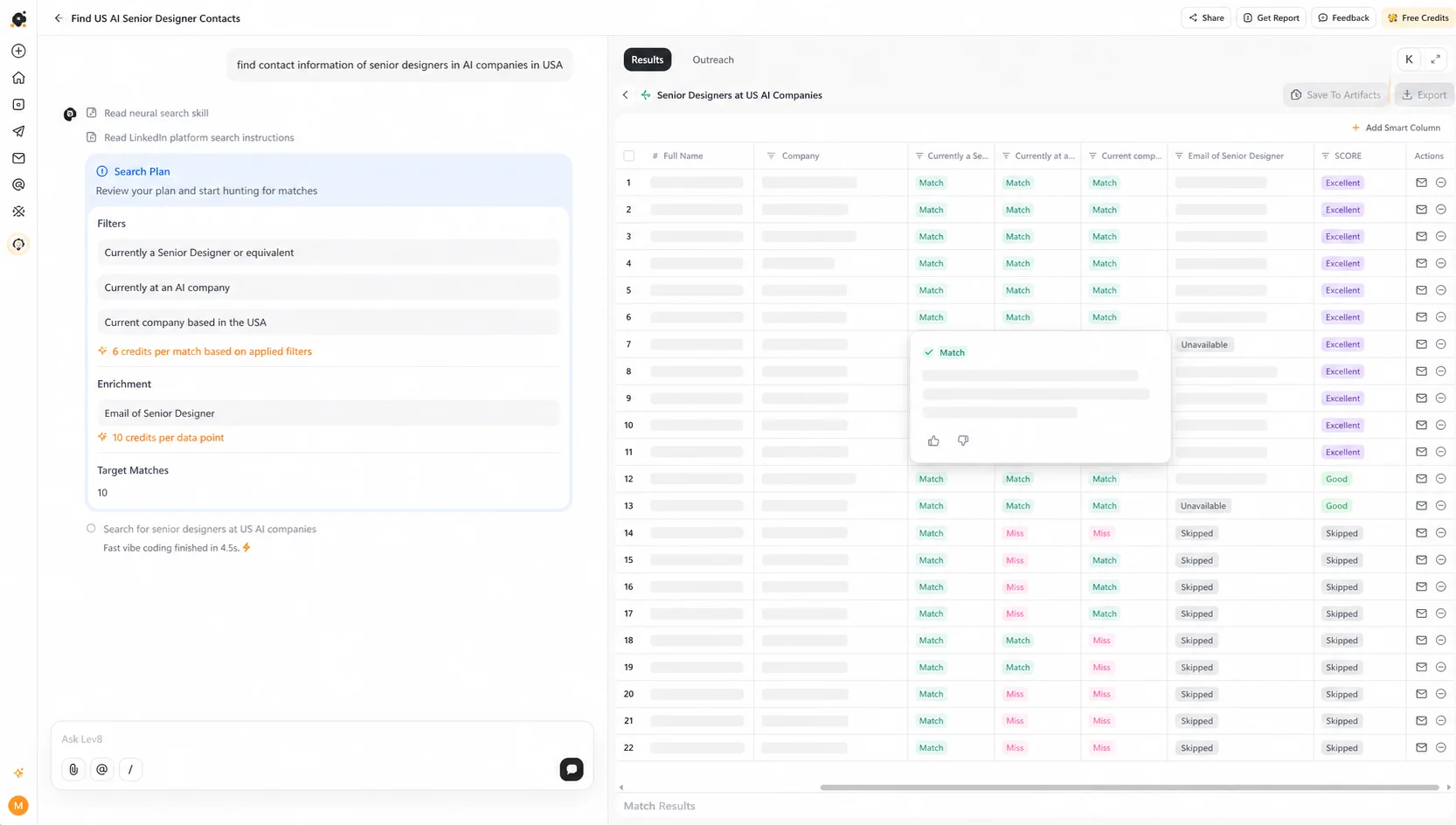
Lev8 BUILD can sit in this part of the workflow: enrich across sources, verify contact fields, and keep source and confidence attached to the output instead of sending raw fields downstream.
Step 6: Merge a Golden Record Without Polluting the CRM
“Newest value wins” is a dangerous merge rule.
A provider can return a newer title that is less reliable than the one a rep confirmed yesterday. It can return a different email for the same person. It can fill a phone field that sales later discovers is a switchboard.
Use field-level merge rules:
- User-confirmed CRM value.
- Verified value with strong confidence.
- Higher-priority source.
- Newer timestamp.
- Fallback value stored without overwrite.
| Field | Current CRM value | Enriched value | Action |
|---|---|---|---|
| Work email | user-confirmed | new provider email | Keep CRM value |
| Job title | blank | VP Revenue Operations | Fill empty field |
| Mobile phone | old source, unverified | verified mobile | Replace if rule permits |
| Company size | 51-200 | 201-500 | Store with source timestamp |
| Tech stack | blank | HubSpot, Snowflake | Fill empty field |
The golden record should show source lineage. Where did the value come from? When was it checked? Did it pass verification? Can it be overwritten?
Those details are not housekeeping. They decide whether the CRM stays trusted.
Step 7: Sync to CRM and Measure Cost per Usable Contact
Enrichment has no value until it changes an action.
That action might be routing a lead, assigning an owner, suppressing a risky email, choosing a phone sequence, or personalizing the first line. A record that never affects execution is just database decoration.
Map fields before launch.
| Enriched field | CRM field | Overwrite rule | Refresh cadence |
|---|---|---|---|
| work_email | Never overwrite user-verified | 30-90 days | |
| email_status | Email Verification Status | Always update | Every verification |
| email_source | Email Source | Always append | Every enrichment |
| phone_mobile | Mobile Phone | Fill blank or replace low-confidence | 60-120 days |
| phone_status | Phone Verification Status | Always update | Every verification |
| job_title | Title | Fill blank, flag conflict | 30-90 days |
| company_size | Company Size | Update with source timestamp | Quarterly |
| confidence_score | Enrichment Confidence | Always update | Every enrichment |
| last_verified_at | Last Verified Date | Always update | Every verification |
Then measure the number that actually matters:
Cost per usable contact =
total enrichment and verification cost / records with verified required fields
Match rate is only the first layer. A contact with a valid email, correct role, source history, and CRM-ready fields is more valuable than ten contacts with uncertain data.
For outbound, a bounce-adjusted view is even better:
Bounce-adjusted cost =
enrichment cost + wasted sends + deliverability risk from bad contacts
That is the cost most teams feel, even if they do not calculate it.
Example: One Lead Through a Waterfall Enrichment Workflow
Here is a simple record moving through the workflow.
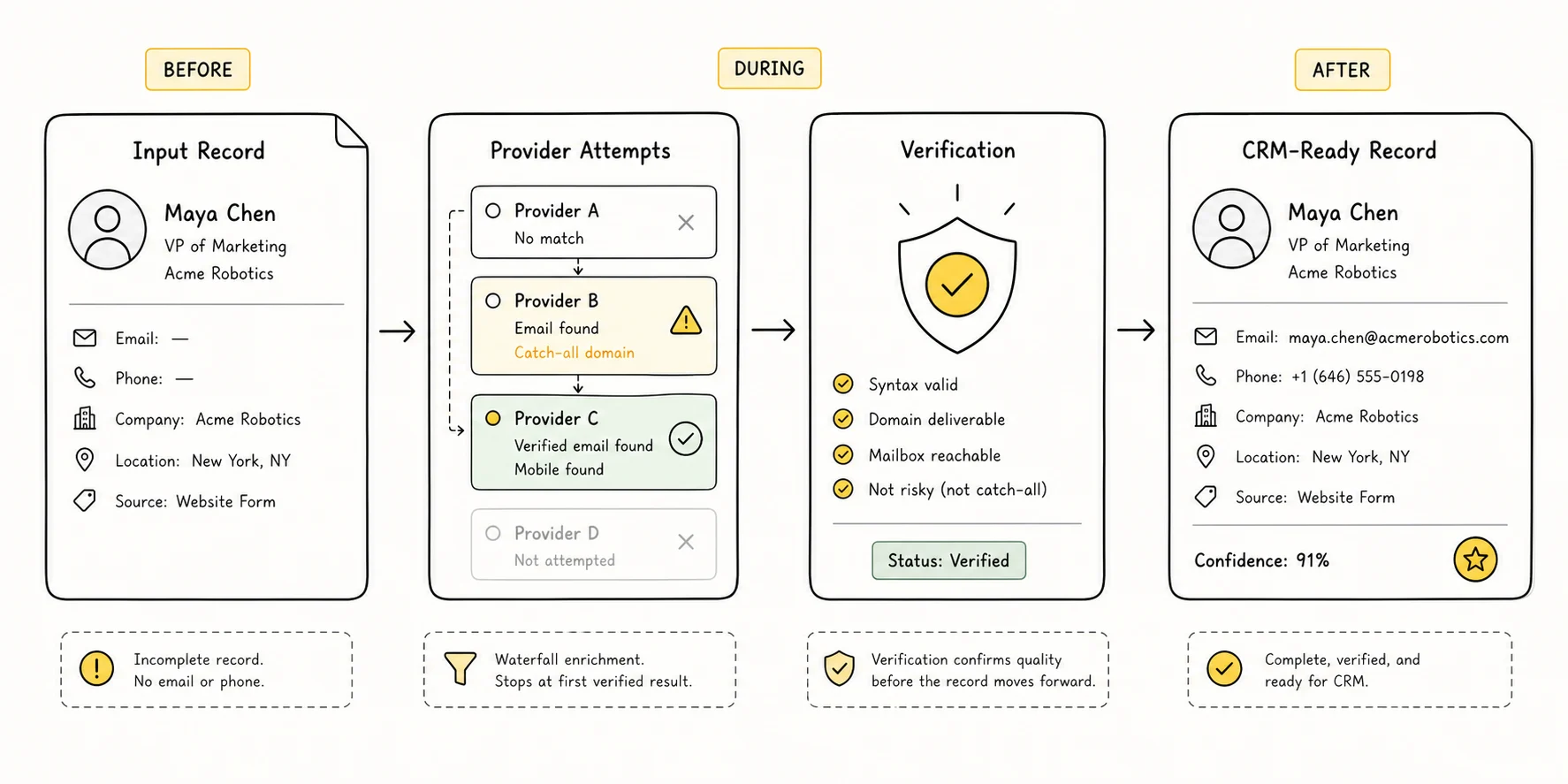
Input record:
| Field | Value |
|---|---|
| Full name | Maya Chen |
| Company domain | example-saas.com |
| LinkedIn URL | linkedin.com/in/mayachen |
| Country | United States |
| Known email | blank |
| Target role | RevOps / Revenue leader |
Provider attempts:
Provider A
No work email found
Continue
Provider B
maya [at] example-saas [dot] com, catch-all
Keep as risky, continue fallback
Provider C
mchen [at] example-saas [dot] com, valid, confidence 91
Stop email waterfall
Provider D
Mobile found, confidence 82
Keep only if phone is required
Verification
Email valid, phone usable
Mark sequence eligible
CRM sync
Fill email, phone, title, source, status
Route to outbound queue
Final golden record:
| Field | Final value |
|---|---|
| Work email | mchen [at] example-saas [dot] com |
| Email status | Valid |
| Email source | Provider C |
| Phone mobile | Available |
| Phone status | Usable |
| Title | VP Revenue Operations |
| Confidence score | 91 |
| Last verified at | Current date |
| CRM action | Route to RevOps outbound sequence |
The useful part is not the number of provider calls. It is the sequence of decisions: reject weak data, continue when the result is risky, stop when the required field is verified, and write the source back into the CRM.
That is controlled enrichment.
Common Mistakes That Burn Credits Without Improving Data Quality
Running enrichment on the full list is usually where the spend problem starts.
Say 5,000 contacts go in. Only 2,000 match the actual ICP. The other 3,000 can still receive emails, phones, titles, and firmographics, but now sales has a larger pile of polished bad fits. This is why only enrich when it affects a decision works better as an operating rule than “complete every record.”
Another quiet leak: provider overlap.
Teams add a second and third vendor expecting a clean lift. Sometimes they get it. Other times the workflow returns the same data reshuffled, plus a few extra risky emails. The way to catch this is boring but effective: test a small batch and measure incremental usable records by provider, not just total matches.
“Verified” is not one status.
Valid, catch-all, unknown, and risky should not land in the same bucket. A catch-all email can be a coin flip on whether it bounces. If those records flow straight into a sequence, the enrichment tool looks successful while the sending domain takes the hit.
Cache rules feel optional until the second import runs.
A segmentation change, CRM sync, or workflow rerun can trigger the same lookup again. Nothing looks broken. No one gets an error. Credits quietly disappear. A last_enriched_at check and source cache prevent the same record from being paid for twice.
Match rate can make the workflow look better than it is.
An 80% match rate sounds strong until sales trusts only half the output, 20% of emails are catch-all, and the phone field is filled with numbers nobody can use. Cost per usable contact is less flattering, but it tells the truth.
When to Use a Platform, No-Code Orchestration, or Direct APIs
Architecture depends on volume and control.
| Architecture | Best for | Strength | Risk |
|---|---|---|---|
| Spreadsheet or manual batch | Small tests, low volume | Fast to start | Hard to scale, easy to duplicate work |
| No-code orchestration | RevOps and growth teams | Flexible logic, quick iteration | Can become messy without naming and cache rules |
| Platform workflow | Teams that want search, enrichment, verification, and sync together | Less operational glue | Still needs credit discipline and clear stop rules |
| Direct APIs | High-volume or technical teams | More cost control and custom logic | Requires engineering and monitoring |
For a few dozen contacts a week, a single provider plus verification may be enough. For thousands of enrichments a month, hit rates, provider overlap, cache rules, and cost per usable contact start to matter fast.
Some teams eventually move to direct APIs because the math does not add up through middleware. Others stay with a platform because orchestration speed matters more than squeezing every credit. Both choices can be right.
Lev8 is most useful when the team wants the workflow connected: qualified company and people search, waterfall data enrichment, verified contacts, and CRM-ready records in one execution path.
Build a waterfall enrichment workflow that verifies emails and phone numbers before outreach. Start from Lev8 to turn qualified records into verified, CRM-ready contact data.
Conclusion: Build the Rules Before You Buy More Data
Waterfall enrichment is not automatically cheaper, cleaner, or more accurate.
It becomes useful when the workflow has gates: fit filters before lookup, field-level provider order, verification before outreach, stop conditions after reliable matches, CRM merge rules, and a cost metric tied to usable records.
That is the work.
More vendors can help after those rules exist. Before that, they mostly create a more expensive version of the same data problem.