



To find decision makers at a target account, do not start by searching for the CEO's email. Start with the company URL, turn it into an account profile, then use that context to identify the people most likely to own the problem, influence the budget, or route you to the right buyer.
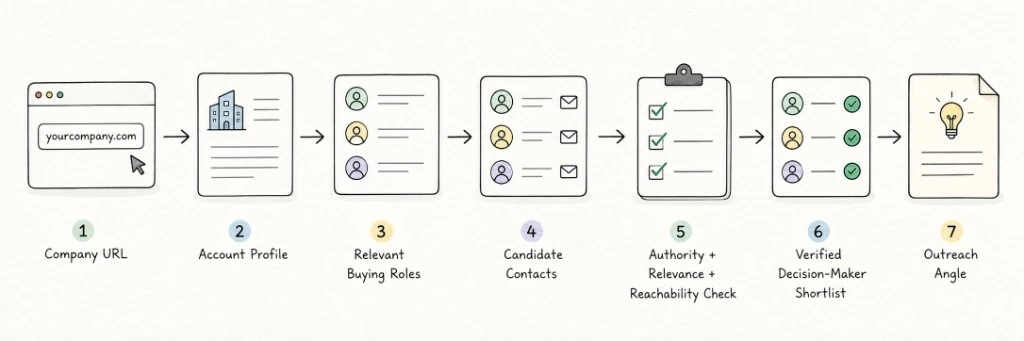
A practical company URL lookup workflow looks like this:
1
Does this company match your ICP?
Account fit
2
Which function is most relevant?
Relevant department
3
Who likely owns the problem, budget, or influence?
Buying roles
4
Which people match those roles?
Candidate contacts
5
Are they current, relevant, and reachable?
Verified shortlist
6
Why should this person care now?
Outreach angle
The goal is not to collect more contacts. The goal is to turn one company URL into a clear, verified, outreach-ready shortlist.
Why Finding "The Decision Maker" Is Harder Than Looking Up a Title
Many teams start decision-maker research by searching for titles like CEO, Founder, VP Sales, Head of Marketing, or Director of Operations.
That can work in simple cases, but it often leads to the wrong person.
A title does not automatically mean buying authority. In a small company, the founder may own the budget, the problem, and the buying decision. In a mid-market company, the person pushing the purchase may be a department head, operations lead, or growth manager. In an enterprise account, the final signer, daily user, technical evaluator, internal champion, and procurement stakeholder may all be different people.
Good decision-maker research should not only answer, "Who is the most senior person?"
It should answer:
- Who is closest to the problem?
- Who owns or influences the budget?
- Who can move the conversation internally?
- Who is likely to respond?
- Who can route you to the right person?
- Who has a current reason to care?
This is where target account research becomes more useful than basic B2B lead generation. A valid email address only matters if it belongs to someone relevant, current, and worth contacting.
Step 1: Start With the Company URL and Build the Account Profile
A company URL is a strong starting point, but it is not a sales lead by itself. First, turn the URL into an account profile.
Start with the basics: company name, domain, industry, location, company size, product or service, customer segment, and business model.
Then look for context that helps you understand the buying path:
- Team and leadership pages
- Careers pages
- Recent news or press releases
- Customer stories
- Blog content
- Tech stack signals
- Social activity
- Hiring patterns
- Recent business initiatives
At this stage, you are trying to answer three questions:
- Does this account fit your ICP?
- Which department would feel the problem you solve?
- Is this account worth deeper contact research?
For example, if you sell sales intelligence software, the relevant function may be sales, growth, RevOps, or founder-led GTM. If you sell conversion optimization services, the relevant function may be performance marketing, demand generation, growth, or paid media.
You can do this manually by reviewing the website, LinkedIn, job posts, and public records. If you are working from a company URL or partial account record, a data enrichment tool can help turn that raw input into richer account context before you move into contact research.
The important point is sequencing: qualify the account before you start collecting contact data.
Step 2: Decide Which Buying Roles Matter for This Account
Before you find the decision maker, define what "decision maker" means for this account.
In B2B sales, you are often looking for a set of buying roles, not one perfect title:
- Economic buyer: controls or heavily influences the budget
- Problem owner: feels the pain your product solves
- Champion: can advocate for change internally
- Technical evaluator: reviews implementation, security, integration, or feasibility
- Influencer: shapes vendor preference or buying criteria
- Gatekeeper or router: can direct you to the right stakeholder
| Account Type | Common Entry Point | Likely Buying Roles | What to Watch For |
|---|---|---|---|
| SMB or owner-led business | Founder, Owner, General Manager | Founder may own budget and operations | Short buying path, but the pain must be specific |
| Mid-market company | Director, Head of Function, Ops Lead, Marketing Lead | Department head may be problem owner or champion | May still need VP or finance approval |
| Enterprise account | VP, Director, Senior Manager, Procurement, Technical Lead | Usually a buying committee | Do not only target the highest title |
| Technical product | CTO, Engineering Lead, IT Manager, Security Lead | Technical evaluator can shape the deal | Validate tech stack and implementation ownership |
| Marketing or growth product | CMO, Growth Lead, Demand Gen Manager, Paid Media Manager | Budget owner and operator may be different people | Target the person closest to the active growth motion |
This prevents a common mistake: using the same title filter for every account.
A "decision maker" in a 20-person company and a "decision maker" in a 2,000-person company are not the same thing.
Step 3: Use Signals to Prioritize the Right Person, Not Just the Highest Title
A title tells you who might be relevant. Signals help you decide who may be worth contacting now.
A useful signal is rarely just one data point. It is usually a combination of context, role, timing, and business motion.
For example:
- The person owns a relevant function
- The company recently launched a related initiative
- The team is hiring for roles connected to the problem you solve
- The person was recently promoted into a relevant role
- The company appears to be investing in a related area
- Public content shows pain or interest around your category
- The person is more accessible than the most senior executive
A single signal suggests possible relevance. A compound signal suggests priority.
For example, a VP Marketing title alone does not prove much. But if the company is expanding paid acquisition, hiring demand generation roles, and growing its marketing team, a Growth Lead or Demand Gen Manager may be more relevant than the CEO.
This is the difference between basic list building and strong target account research. Basic B2B lead generation asks, "Who exists at this company?" Better account research asks, "Who has a reason to care right now?"
In a tool-assisted workflow, a decision maker finder can help connect role relevance, buying-committee context, and contact data so you are not relying on title search alone. The principle stays the same: prioritize the person closest to the active business problem, not simply the person with the highest title.
Step 4: Find Candidate Contacts From the Account
Once you know which buying roles matter, move into contact discovery.
Useful sources include:
- Company team, leadership, about, and press pages
- LinkedIn company pages and employee search
- Sales Navigator filters by title, function, and seniority
- Job descriptions that reveal department ownership
- Press releases, webinars, podcasts, and event pages
- Case studies and customer stories
- B2B databases or contact enrichment tools
Avoid starting with a generic search like "CEO email" or "founder email." That usually skips the role-mapping work that makes outreach relevant.
A better approach is to identify 3-5 candidate roles first, then find the people who match them.
If you sell customer support automation, your candidate roles may include VP Customer Success, Head of Support, Operations Director, and CX Lead. If you sell data security software, they may include CISO, IT Director, Security Engineering Lead, or Compliance Owner.
A contact finder can help when the account has no clear team page, LinkedIn results are crowded, or the same company has multiple people with similar titles. The value is not producing the longest possible contact list. It is narrowing the list to people who are relevant and verifiable.
Step 5: Verify Authority, Relevance, and Reachability Before Outreach
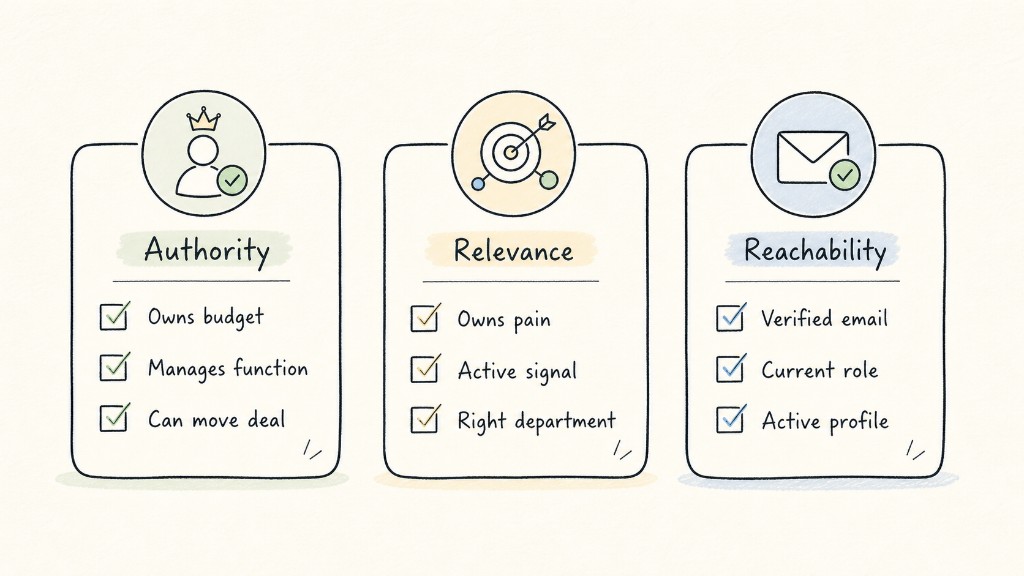
Do not send the email as soon as you find a name. First, verify authority, relevance, and reachability.
Authority check
- Does this person manage the relevant function?
- Could they own or influence budget?
- Can they move an internal conversation forward?
- If they are not the final approver, could they be a champion?
Relevance check
- Is their role directly connected to the problem you solve?
- Is the company showing related business activity?
- Is their team hiring, expanding, or changing?
- Is there public evidence that this problem may matter to them?
Reachability check
- Is the email verified?
- Is the LinkedIn profile current?
- Is the title up to date?
- Is there a risk the contact has left the company?
- Is there a better person to contact first?
This step protects you from two expensive mistakes: contacting someone irrelevant, or contacting someone who looks right but is outdated, unreachable, or disconnected from the buying process.
A valid email is the floor. The real question is why this contact is worth reaching out to now. After you have a shortlist, use an email verifier to check whether the address is valid before adding the contact to a sequence.
Example: From One Company URL to an Outreach-Ready Decision-Maker Record
Imagine you only have one target account URL. You sell a tool that helps B2B teams improve outbound data quality and contact verification.
Input:
examplecompany.comStep 1: Build the account profile
The website shows a 300-person B2B SaaS company selling to enterprise sales teams. The careers page shows open roles for a Sales Operations Manager and an SDR Team Lead.Step 2: Identify the relevant function
Because your product affects sales prospecting, contact quality, and outbound workflows, the relevant functions are Sales, RevOps, and Growth.Step 3: Map buying roles
Candidate roles include VP Sales, Head of RevOps, Sales Operations Manager, and SDR Manager.Step 4: Validate signals
The company appears to be expanding its SDR motion. That suggests data quality, contact verification, routing, and workflow efficiency may become more important. The Sales Operations Manager may be closer to the execution pain than the VP Sales.
Decision-maker shortlist
| Contact Role | Why This Person | Signal | Confidence | Outreach Angle |
|---|---|---|---|---|
| Head of RevOps | Likely owns data, process, and tooling | SDR expansion plus RevOps ownership | High | Improve data quality before outbound scale |
| Sales Operations Manager | Close to day-to-day workflow pain | Hiring for related operations role | Medium-High | Reduce manual verification and bad contacts |
| VP Sales | May own budget and growth targets | Responsible for sales efficiency | Medium | Improve pipeline quality as the team scales |
This is what a useful output looks like. You are not just finding an email. You are creating a decision-maker record with context, confidence, and a reason to reach out.
Common Mistakes When Finding Decision-Makers
The first mistake is assuming the CEO is always the best target.
The CEO may have final authority, but they may not be closest to the pain, and they may not respond to cold outreach. In many accounts, the better entry point is a problem owner or internal champion.
The second mistake is relying only on job titles.
A Director title can mean very different things depending on company size, reporting structure, and department maturity. Titles need to be interpreted through account context.
The third mistake is skipping account fit.
If the company does not match your ICP, a complete contact record is still a low-quality lead.
The fourth mistake is treating an email finder like a decision-maker finder.
Email tools can help you find contact data. They cannot, on their own, decide who has buying relevance.
The fifth mistake is sending a generic pitch after doing all the research.
Strong outreach does not say, "I saw you are VP of Sales." It says, in effect, "I noticed your team is dealing with a context where this problem usually shows up."
When to Use a Tool-Assisted Workflow
If you are researching 5-10 high-value accounts, manual work can be enough. You can review each website, LinkedIn profile, job post, and public signal by hand.
But once you are working with dozens, hundreds, or thousands of target accounts, manual research breaks down quickly.
Common problems include:
- The account list is too large to review one by one
- LinkedIn results are noisy
- One database does not cover every contact
- Emails may be stale
- Titles may be outdated
- Different account types require different role mapping
- Contacts still need to be pushed into a CRM or sequence
A tool-assisted workflow should not simply automate more outreach. Its value should be compressing the research and verification steps.
A cleaner workflow is:
The output should be a focused list of relevant contacts, not a giant spreadsheet.
Final Checklist: Is This Contact Worth Reaching Out To?
Before contacting someone, confirm:
- Does the account match your ICP?
- Is this person in the relevant function?
- Is their role close to the problem you solve?
- Could they own budget, influence, or internal momentum?
- Is there a recent signal that supports "why now"?
- Is their email or LinkedIn profile verifiable?
- Do you know what pain point your first message should reference?
- If they are not the final decision maker, could they be a champion or router?
If you cannot answer most of these, do not rush the outreach. Go back to the account profile and role-mapping steps.