




There are hundreds of GTM tools, but a small B2B team does not need hundreds of features. It needs a simple way to answer four everyday questions:
- Where do we keep customer information?
- How do we find the right companies and people?
- How do we contact them and remember the next step?
- How do we know what is working?
If your current tools answer those questions without creating extra manual work, your stack may already be good enough. Add another tool only when you can name the problem it will remove.
Quick Answer
A practical GTM tech stack usually starts with a CRM, one dependable way to find potential customers, a simple follow-up process, and basic reporting.
That does not always mean four separate products. HubSpot, for example, may cover several jobs for a small team. A founder might use a CRM, email, calendar, and one prospecting tool. A growing SDR team may later add contact verification, sales engagement, enrichment, or buying signals, but only when the existing process starts to break.
The goal is not to build an impressive stack. It is to move a promising account from "we should talk to them" to a clear next action with as few gaps as possible.
Start With How You Sell
Before comparing software, look at how your team actually wins customers.
A founder selling to 50 named companies has a very different job from a product-led company receiving 5,000 sign-ups. The founder may need good account research and reliable contact details. The product-led company may need to identify active users, route them to the right owner, and trigger timely follow-up.
Write down one real journey from start to finish:
We identify a target company, find a relevant person, check the contact details, send a useful message, record the response, and decide what happens next.
Now mark where that journey slows down. That is the best clue about what your stack needs next.
If the team cannot agree on its target customer, a larger database will produce more bad leads. If contact details are unreliable, faster outreach will create more bounced emails. If nobody records the outcome, better analytics will not have useful data to measure.
The Four Jobs Your Stack Must Cover
The names used by software vendors can sound complicated. Underneath them, most small teams are trying to cover four simple jobs.
1. Keep Customer Information in One Place
Your team needs one place to see the latest company, contact, conversation, owner, and deal status. This is usually a CRM.
It can be lightweight. The important part is that everyone knows where to look. If one person keeps notes in a spreadsheet, another uses their inbox, and a third stores research in browser tabs, the team will lose context even if every tool works correctly.
Save information that changes a decision: who owns the account, why it matters, what happened last, and what should happen next.
2. Find Potential Customers
You need one dependable way to make potential buyers visible.
For outbound sales, this may mean searching for companies that match your ICP and finding relevant people inside them. If you already know the person's name and company, or can describe the role you need, an email finder can help turn that target into a usable work contact. For inbound, acquisition may mean capturing form submissions. For product-led growth, it may mean identifying users who have reached an important usage milestone.
Start with the channel you can actually operate every week. Do not buy tools for five future channels before one channel produces useful opportunities.
3. Contact People and Follow Up
Once you find a potential buyer, someone needs to contact them, record what happened, and know when to follow up.
A founder may only need email, a calendar, and CRM reminders. A team of SDRs may need shared sequences, calling, reply handling, and rules that prevent two reps from contacting the same person.
The test is simple: can the team see the latest interaction and the next action without asking around?
4. See What Produces Real Opportunities
You do not need an advanced attribution platform to begin. You do need to know which activity creates qualified conversations and pipeline.
Track a few useful outcomes: positive replies, qualified meetings, opportunities created, and reasons prospects were disqualified. Metrics such as emails sent or contacts added show activity, but they do not prove the stack is helping the business.
These four everyday jobs are often described as System of Record, Acquisition, Engagement, and Measurement.
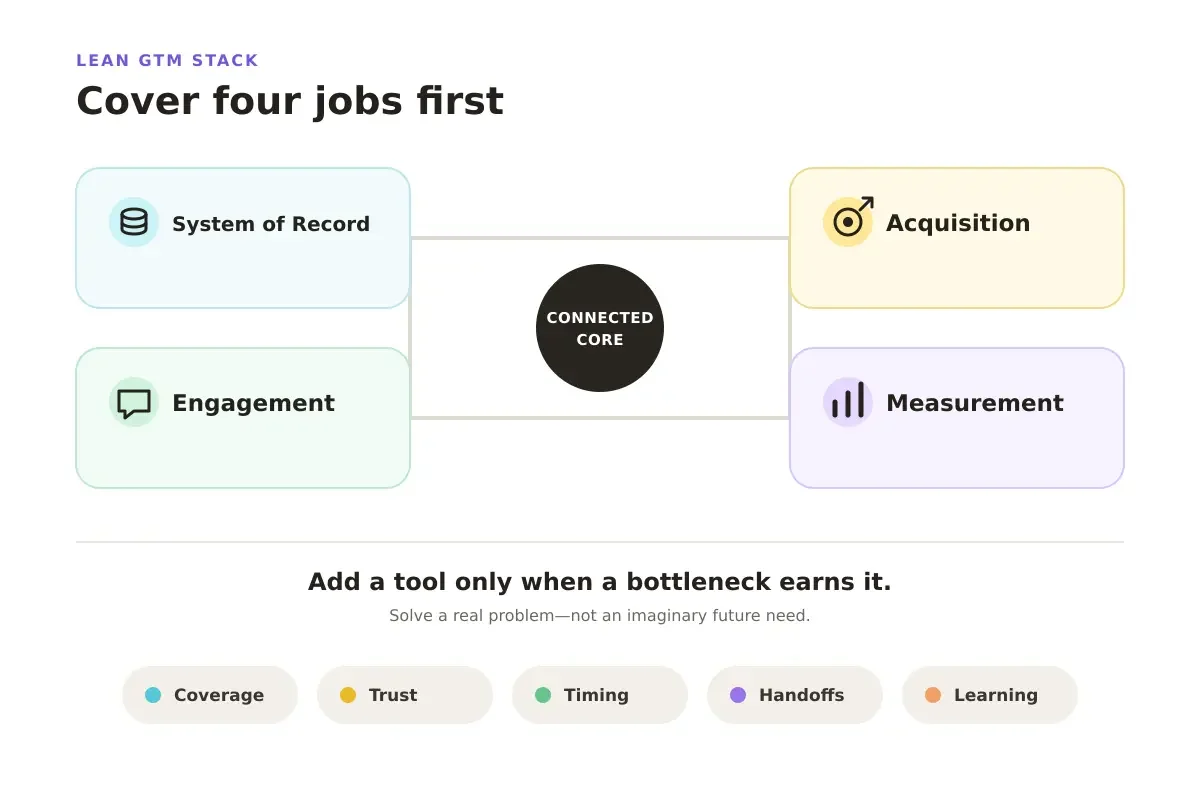
Cover four foundation jobs first, then add another tool only when coverage, trust, timing, handoffs, or learning becomes the constraint.
Five Signs You May Need Another Tool
Do not add a product because its category appears in someone else's stack diagram. Add it when you repeatedly see one of these problems.
You Cannot Find Enough Relevant People
Your team has a clear target market but cannot identify enough matching companies or contacts. A prospecting database, contact finder, or research tool may improve coverage.
First check the targeting rules. More records will not help if the team cannot describe a good-fit account or relevant role.
You Do Not Trust the Data
Records are incomplete, duplicated, outdated, or full of email addresses that bounce. This is when enrichment, deduplication, or contact verification becomes useful.
An email verifier can check whether an address appears able to receive mail before outreach. It cannot tell you whether the person is the right buyer or whether now is the right time to contact them.
If you already have a lead list but the records are incomplete, use this verified work email and social profile Playbook as the practical next step.
You Have Too Many Accounts and Do Not Know Where to Start
The team has enough names but no clear priority. Account research and buying signals may help show what changed and why a company may be worth attention now.
A useful signal should change the next action. If every website visit or funding announcement creates another alert, the tool has added noise rather than priority.
Work Gets Lost Between People or Tools
Research is completed, but sales never sees it. Leads wait too long for an owner. Contact data must be copied manually between systems. This is when routing or workflow automation may help.
Automate a rule the team already understands. "Assign qualified US demo requests to this owner" is safer than "send every interesting account to sales" when nobody has defined interesting.
You Cannot Learn From Results
The team runs outreach but does not know which targets, messages, or signals produce qualified opportunities. Better reporting or conversation intelligence may help, but only if someone will use the findings to change the next campaign.
The GTM loop engineering framework explains how results can feed back into targeting and execution.
A Simple Stack for Three Common Situations
Use team stage as a shortcut, not a strict rule. Choose the row that looks most like your current workflow.
| Your Current Situation | Start With | Add Next When... | Usually Wait On |
|---|---|---|---|
| A founder is testing a market | Lightweight CRM, email and calendar, one way to find prospects, simple pipeline tracking | Finding contacts or scheduling becomes repetitive | Complex routing, intent platforms, advanced attribution |
| A small sales team has a clear ICP | CRM, prospecting data, contact verification, shared follow-up process, basic pipeline reporting | Research, prioritization, or manual handoffs slow the team down | A large collection of specialist tools without clear owners |
| Several channels and teams share leads | Governed CRM, routing, enrichment, engagement workflow, automation, and reporting | A measurable gap still causes lost leads or poor decisions | Any extra tool without an integration plan or success measure |
The second row does not mean every small sales team needs five products. One platform may cover prospect discovery, contact data, verification, and outreach preparation. Count the jobs covered, not the logos purchased.
Suite or Specialist Tools?
A suite is often easier for a small team because data, permissions, and workflows stay together. Specialist tools make sense when one problem matters enough to justify extra cost and integration work.
Before buying a specialist product, ask:
- Does something we already pay for solve this well enough?
- Which repeated problem will the new tool remove?
- Who will own setup, data quality, and failures?
- What information must move between systems?
- Which result will tell us the purchase worked?
Choose a suite when simplicity matters more than the last 10% of specialist performance. Choose a specialist when the improvement is important, measurable, and someone can maintain it.
For a broader discussion of tool overlap, see AI Sales Agents Are Killing the 5-Tool Stack.
Run This Five-Minute Check Before Buying
Pick one recent prospect and follow their journey across your current tools.
For each tool, write down:
- What decision does it help us make?
- What information do we put into it?
- What useful output comes back?
- Where do we copy or repeat work?
- What would stop working if we removed it?
Then label each tool: keep, combine, replace, or postpone.
This simple check often reveals that the real problem is not the number of tools. It is the gaps between them. Research stays in browser tabs. Contact data comes from several sources. Verification happens only after the list is built. The message loses the context that made the company interesting.
Where Lev8 Can Help
When prospecting is the fragmented part, Lev8 can help move from an ICP or target-company list to company research, relevant people, contact enrichment and verification, and outreach preparation. Teams starting with company URLs can use the decision-maker and verified email Playbook to test that connected path directly.
This can reduce several research and data handoffs. It does not replace the need for a CRM, clear account ownership, responsible outreach rules, or pipeline measurement.
The practical question is: Can one connected workflow get your team from a target idea to an outreach-ready contact with less manual work?
What's Next
A modern GTM stack is not the one with the most tools. It is the smallest setup that helps your team find the right opportunity, take the next action, and learn from the result.
If research, contact discovery, and verification still happen across several disconnected steps, use Lev8 to test a more connected prospecting workflow.