




For sales teams, knowing a person's name, title, company, and email address does not mean you understand the customer.
A traditional sales list can usually answer a few basic questions. Who is this person? Where do they work? Can you contact them? In real sales work, the more important questions are different. Do they fit your ICP? Do they influence budget or purchasing decisions? Is their company showing signs of a new business need? Is there a good reason to reach out now?
These questions go beyond the traditional idea of customer identity, but they are central to deciding whether sales has found the right person. For a sales team, valuable customer identity is not just contact data. It is the relationship between a person, their business context, and the current sales opportunity.
What Customer Identity Means in Sales
In a CDP or marketing context, customer identity usually refers to combining user data from different channels, devices, and touchpoints into a unified customer profile. Twilio Segment explains identity resolution as the process of merging customer history from different touchpoints into one profile, so teams can understand behavior across web, mobile, server, and other sources.
For sales teams, customer identity has a different focus.
Sales teams care about whether a contact belongs on a prospect list, whether that person should be prioritized, and what reason sales has to reach out.
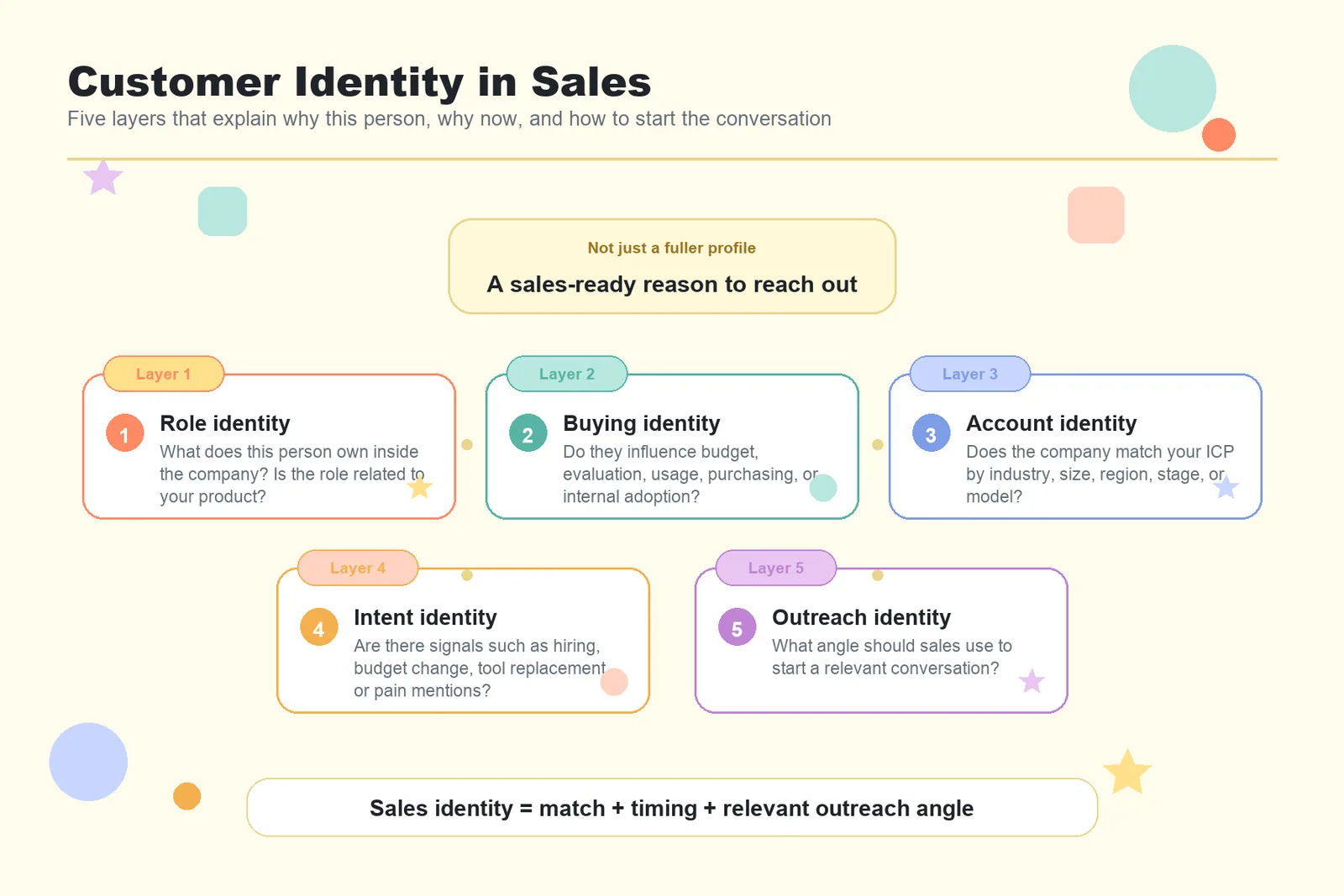
In a sales context, customer identity usually includes five layers.
- Role identity: What does this person own inside the company? Is their role related to your product?
- Buying identity: Do they influence budget, purchasing, evaluation, usage, or internal adoption?
- Account identity: Does their company match your ICP by industry, size, region, growth stage, or business model?
- Intent identity: Are there signals such as budget changes, expansion, hiring, tool replacement, pain point mentions, executive changes, or other buying intent signals?
- Outreach identity: What angle should sales use to start a relevant conversation, instead of sending a generic message?
For sales, customer identity is not about making a profile more complete. It is about understanding why a person matches, why now may be the right time to reach out, and how to start the conversation.
Why Traditional Identity Resolution Is Not Enough for Sales
Traditional customer identity resolution is more closely tied to customer data platforms and marketing data management. It helps teams unify user behavior across channels into a single profile.
That matters for marketing attribution, segmentation, and lifecycle programs, but it does not directly answer the questions sales teams deal with every day.
A unified customer profile does not always tell an SDR who owns the budget. A verified email address does not prove that a person has buying intent. A company name alone does not show whether the account is worth pursuing right now.
Sales teams need customer intelligence, not only identity matching.
LinkedIn's definition of buyer intent focuses on finding prospects who are researching relevant products or services and may be ready to buy. Forrester also notes that B2B teams need to capture, connect, and interpret buying signals to create more useful buyer interactions at the right time.
This is the key difference in a sales context. The goal is not only to know who someone is. The goal is to understand why that person may need what you sell.
Sales Teams Need a Path From ICP to Outreach Reason
If traditional identity resolution asks whether two records belong to the same person, sales needs to answer a more practical question: is this person worth contacting now?
That requires a fuller decision path. First, define the ideal customer profile. Then test whether that profile can return real matched leads. Next, understand why each lead matches and who should be contacted first. Finally, turn that context into a specific outreach reason.
Lev8 fits into this workflow. Instead of giving sales a large static list and leaving the team to sort through it later, Lev8 lets sales describe the ideal customer in plain English, test the search direction with a small batch, and expand the search after the ICP looks right. The time savings start before the search itself. Sales teams save time on ICP definition, direction testing, and lead prioritization.
How Lev8 Turns Customer Profiles Into Sales Decisions
1. Describe the Customer You Want to Find
Sales teams can enter a simple English brief in Lev8, including target roles, company type, industry, region, business changes, pain points, or buying signals.
Example brief:
Find sales operations leaders at mid-market SaaS companies that are expanding outbound teams and may need better lead research.
This brief is more than a set of keywords. It becomes the basis for how Lev8 evaluates fit. Lev8 uses the customer profile, business context, and signals in the brief to search for matching people, instead of forcing users to start with rigid filters.
The value here is simple: sales does not start with a vague list. It starts with a customer profile that can be tested.
2. Test a Small Batch Before Expanding the Search
Many sales teams start prospecting by pulling a large list, then discover the direction was wrong. The roles are too broad. The company type is off. The leads do not show a real business need. Many contacts are not the right buyers.
A better way to use Lev8 is to test with a small batch first. Ask Lev8 to return a smaller set of results, then review whether those leads match your brief. Once the direction looks right, increase the result count and run a larger search.
This helps in two ways.
First, it reduces the risk of spending credits on the wrong direction.
Second, it helps the team spot ICP issues early, such as a brief that is too broad, signals that are not specific enough, or a target title that does not reflect the real decision maker.
Lev8 improves sales productivity before the list is built. It helps teams save time while defining the customer profile and validating the search direction.
3. Score Leads Based on the Brief and Explain the Match
A useful lead list should not only contain names and emails. It should explain why each person belongs on the list.
Lev8 uses the user's brief to evaluate and score matched leads. Sales can see why a lead is relevant: whether the role fits, whether the company matches the ICP, whether there are business changes, intent data, or social signals that support the match.
For example, if your brief targets SaaS companies going through organizational change and likely to need new sales tools, Lev8 may prioritize signals such as:
- A company recently hired a new CRO or VP of Sales, so the new revenue leader may review the team's tools and process.
- A target contact recently left one company and joined another, so they may be building a new team or introducing a new way of working.
- A company is hiring multiple SDR, RevOps, or GTM roles, which may suggest outbound or revenue team expansion.
- A leader is posting about pipeline quality, lead research, sales productivity, or outbound conversion, which may point to a real pain point.
These details matter more than title alone. Sales need to decide whether the person is right, whether the timing makes sense, and whether there is a clear reason to reach out.
4. Use Signals to Monitor Customer Movement
Low cold email reply rates are not always caused by lack of interest. Often, the message looks like spam because it has little to do with what the recipient currently cares about.
Google's Email sender guidelines emphasize that senders should avoid misleading content and create a meaningful connection between the sender and the recipient. For sales teams, this means outreach cannot rely only on templates, variables, and bulk sending. The message needs to connect with the buyer's current role, company context, or business signals.
Lev8's signal feature helps sales teams monitor customer movement, including social media changes, new budget signals, new pain point mentions, organizational changes, or signs that a lead may be unhappy with the current state.
When a lead shows a new relevant signal, sales does not need to invent a reason to reach out. The message can start from a real change.
Example:
I noticed your team is expanding outbound, so I wanted to share a way to reduce the time spent on early lead research.
This kind of outreach is based on context, not a generic template.
5. Generate Outreach Copy From Customer Context
The final step in understanding customer identity is turning that context into better outreach.
Lev8 can use the customer background it finds to generate personalized opening lines, cold email drafts, or sales email copy. Sales teams can start from the person's role, company situation, business change, or relevant signal, instead of only replacing the name and company in a template.
The point is not to put every contact's name into a template and send a batch of similar emails. It is better to focus on the leads that matter, then use the buyer's role, needs, and current context as the opening. Strong B2B personalization is not about producing more content. It is about making the message relevant to the buyer's real situation.
Lev8 helps sales turn customer background, business signals, and outreach goals into more specific opening lines, cold email drafts, and sales email copy.
How to Find and Contact Customers in Lev8
Step 1: Enter Your Ideal Customer on the Homepage
Go to the Lev8 homepage and describe the customer you want to find in the input box.
You can include the target role, company type, industry, region, business change, pain point, or buying signal.
Example:
Find heads of sales at B2B SaaS companies in the US that recently hired SDRs or changed sales leadership.
Then click Start for free.
Step 2: Refine Your Search Settings
In the next step, refine the search settings.
You can adjust who you want to find, the search criteria, and the number of results you want returned. For the first run, it is usually better to request a smaller set of results so you can test whether the direction is right.
If the results do not match your expectations, narrow the brief. Add details such as industry, company size, region, seniority, or a more specific business signal.
Step 3: Wait for Lev8 to Complete the Search
A Lev8 search usually takes about 5 to 8 minutes.
During this time, Lev8 searches for matched people based on your brief and organizes relevant contacts, company background, and signals that can help you evaluate fit.
Step 4: Review Scores and Priority
After the search is complete, Lev8 scores leads based on your brief and shows which people may be worth contacting first.
Review the score and match reason before expanding the search. If the first results look accurate, the brief is probably usable. If the results are off, adjust the customer profile before spending more credits on a larger search.
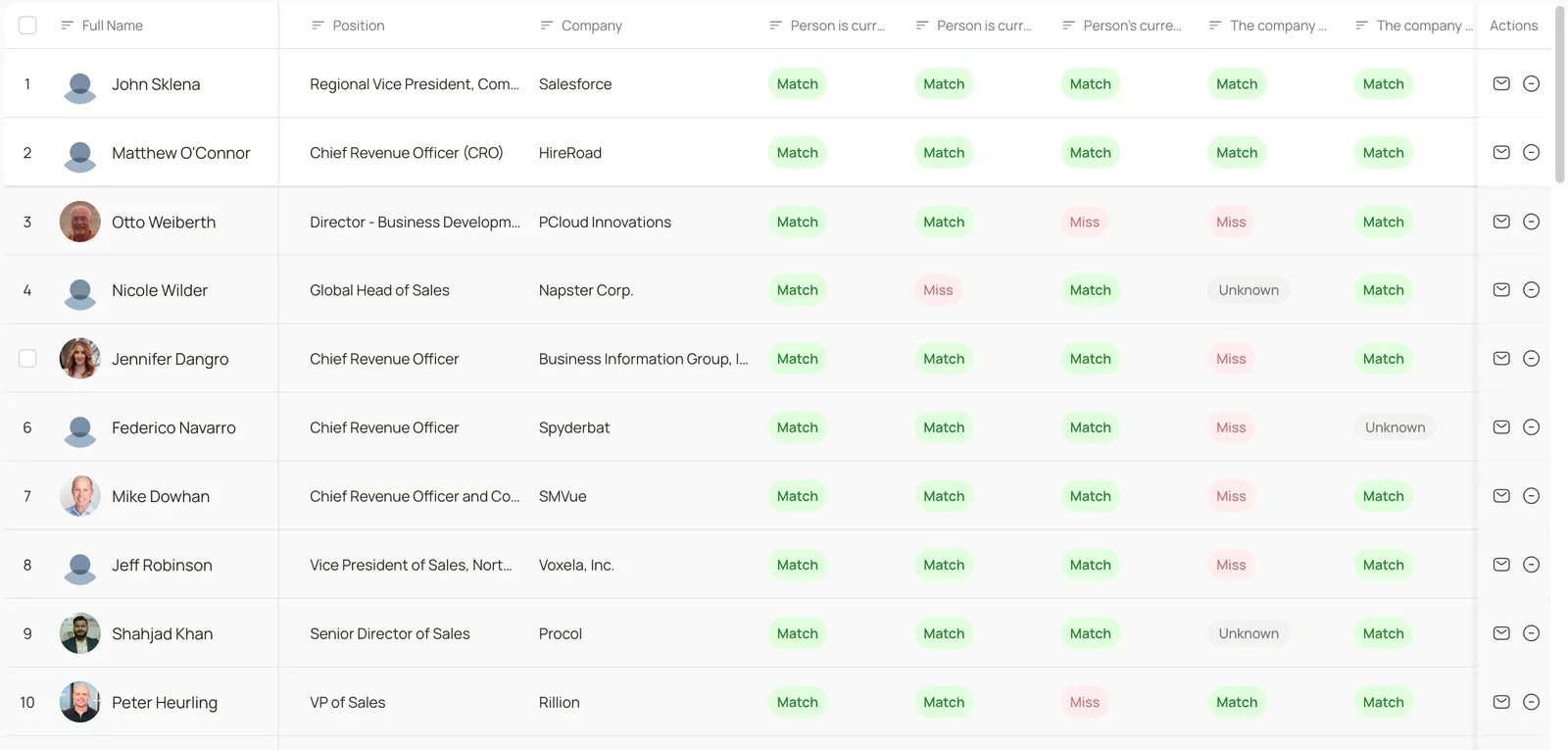
Step 5: Click a Result to Review Customer Details
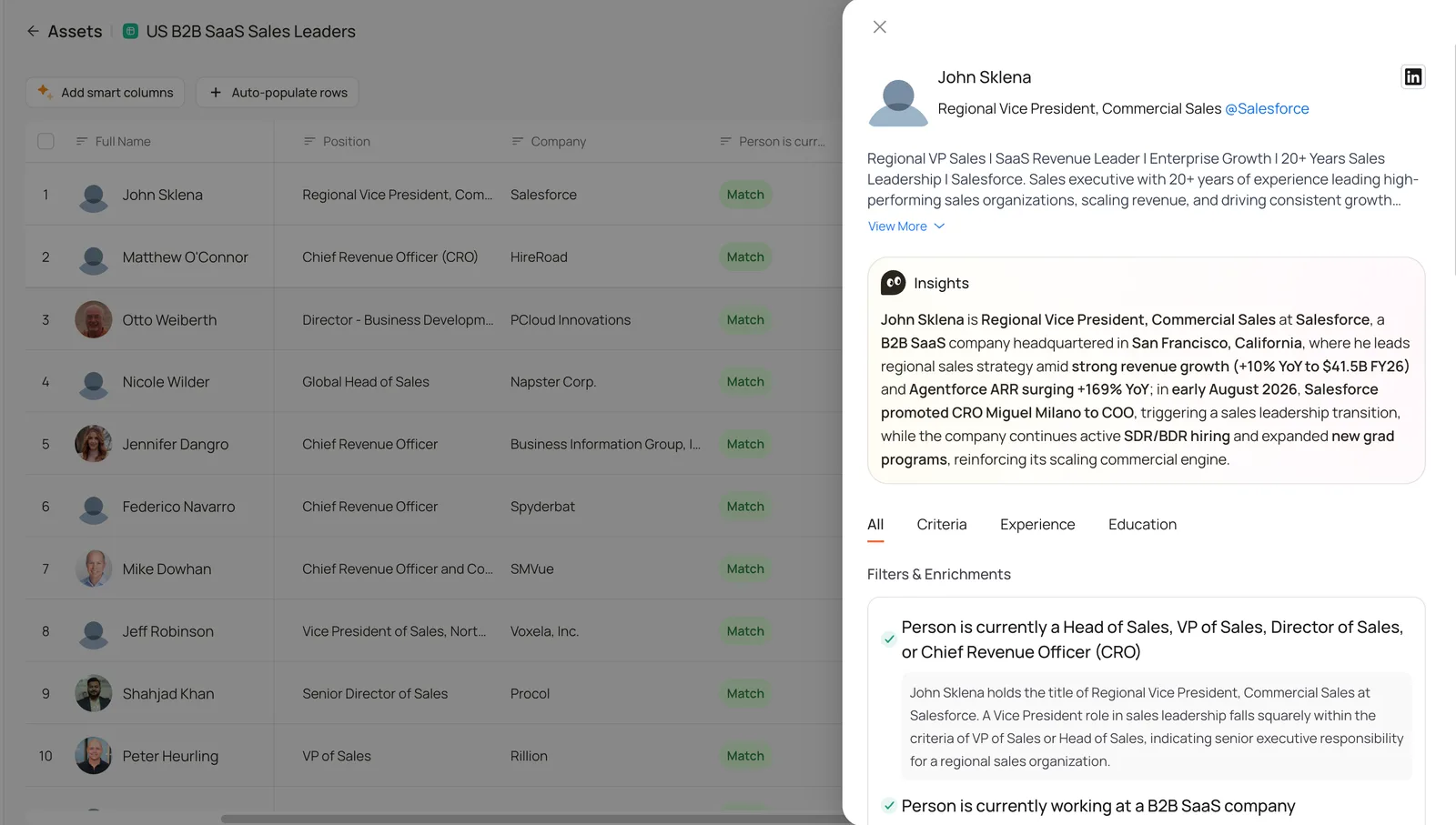
Click a result to review the person's details, including role, company background, match reason, relevant signals, and available public information.
This step matters. Sales should use it to judge whether the AI search is accurate before moving the full list into outreach.
If a lead's role, company, business signals, and brief match are strong, you can move into contact preparation.
Step 6: Use Actions to Generate Outreach
If you want to contact a customer, you do not need to switch to another platform just to draft the message.
In Actions, click the envelope icon and describe your outreach goal. You may want to introduce your product, book a discovery call, test whether the person is dealing with a specific problem, or start a conversation around a recent business change.
Lev8 uses the customer's background and signals to generate cold email or connection copy. It supports outreach preparation for Email, X, and LinkedIn scenarios.
This lets sales move from finding a person, to understanding why that person is worth contacting, to drafting the first message in one workflow.