




Replace Your Prospecting Tool Chain with an AI-Native GTM Teammate
In 2026, more GTM and RevOps teams are searching for a Lusha alternative. Not because Lusha stopped working, but because the requirement changed. Teams no longer need a tool that finds one person's contact details. They need full execution from sourcing to outreach.
Lev8 is built for that. It is not another contact database. It is an AI GTM teammate: you describe the goal in plain language, and it runs sourcing, enrichment, scoring, and personalized multi-channel outreach on its own.
What Is Lusha, and Why Are Teams Looking for Alternatives?
Lusha is a B2B contact data provider. Its Chrome extension pulls emails and direct-dial phone numbers while you browse LinkedIn. It also offers basic CRM enrichment, buying intent signals, and email sequences.
The problem sits underneath all of that: a static database. Lusha updates its data in scheduled batches instead of pulling it live. Industry research estimates that B2B contact data decays by 25-30% per year as people change jobs, get promoted, or switch industries. A static database cannot keep up.
Tool chain fragmentation is the second driver. A typical mid-size GTM team may run ZoomInfo for data, Clay for enrichment, Apollo for sequences, and 6sense for intent. That means four or five tools, multiple contracts, and multiple integration points. Founders and early sales leaders often lack the budget and headcount to maintain that stack. Lev8 compresses the workflow into one chat interface.
These two problems, stale data and fragmented tooling, are why teams evaluate Lusha competitors and tools like Lusha.
Why Are GTM and RevOps Teams Switching from Lusha?
You Spend 10 Credits on a Phone Number, and the Call Fails
Picture the scene. Your SDR finds a strong target on LinkedIn: a VP Sales at a SaaS company that just closed a Series B. The Lusha extension lights up, one click, 10 credits gone, and a phone number appears. The call goes to a dead line.
In Lusha reviews on G2 and Lusha ratings on Trustpilot, some users report higher bounce rates and more dead numbers than expected, especially in Europe and Asia. Lusha's own accuracy claims should be assessed against your ICP because its measurement method is not public. The gap between vendor claims and day-to-day experience appears repeatedly in the review sections.
The real cost is not the credits. It is the time you could have spent reaching a real person. An SDR who loses 30 minutes a day to dead numbers is losing pipeline capacity.
The Credit Model Quietly Changes How Your Team Sells
Credit pricing can influence rep behavior. When revealing phone numbers consumes substantially more credits than revealing emails, phone-first outreach can exhaust a monthly allowance quickly.
The result is predictable. Reps may stop calling because they are afraid of running out of credits. They fall back to email-only outreach, not because email works better, but because calls cost more within the plan. The sales tool starts limiting the team's channel choice instead of enabling it.
This behavioral constraint is harder to quantify than a bounce rate, but it can still affect pipeline. Teams should model credit consumption using their actual contact mix before committing to a plan.
A Static Database Cannot Keep Up with B2B Job Movement
Lusha does not publish a single data refresh rate for every record. B2B contact data is estimated to decay by 25-30% per year, and scheduled batch updates can struggle to outrun that pace. The record you pull today may have been captured months ago.
During the moments that matter most in GTM, such as a hiring surge, funding window, or reorganization, months-old information is close to worthless. The VP Marketing you found may have left last month. The company you tagged as a 50-person team may now be 120. Reach out with stale information and the first reaction is that you clearly do not know them.
After You Find the Person, Four Manual Steps Remain
The Lusha Chrome extension does one job well: revealing contact details. What happens next?
After getting an email, reps may still need to enrich the record, add it to a sequence, sync it to the CRM, and research context for a personalized first message. The exact productivity cost varies by team, but the operational problem is consistent: every manual handoff adds time and another chance to lose data.
That is the ceiling of a static database plus a Chrome extension. It covers contact discovery and leaves the rest of the GTM process to your team.
Your Contact Data May Be Creating Compliance Risk
This is an uncomfortable topic, but it belongs on the list. Lusha says it sources data from community contributions and partners. Contacts may not know that their details are listed in a B2B database or that a mobile number is available to buyers.
In April 2025, Italy's data protection authority, the Garante, announced a formal privacy investigation involving Lusha. As GDPR and CCPA enforcement evolves, tools built on the data broker model deserve careful legal review.
When you send cold emails or make cold calls with third-party data, the risk does not stay with the provider. As the sender, you carry obligations too. If your target market includes EU residents, compliance belongs in your assessment.
How Does Lev8 Replace Lusha? One Full Outreach Task, Start to Finish
All five pain points trace back to one root cause. Lusha is primarily a data lookup tool, while GTM teams increasingly need an execution system. The old workflow moves a list from prospecting to enrichment, sequencing, CRM, and manual research. Every handoff is another task. Lev8 is designed to connect that workflow.
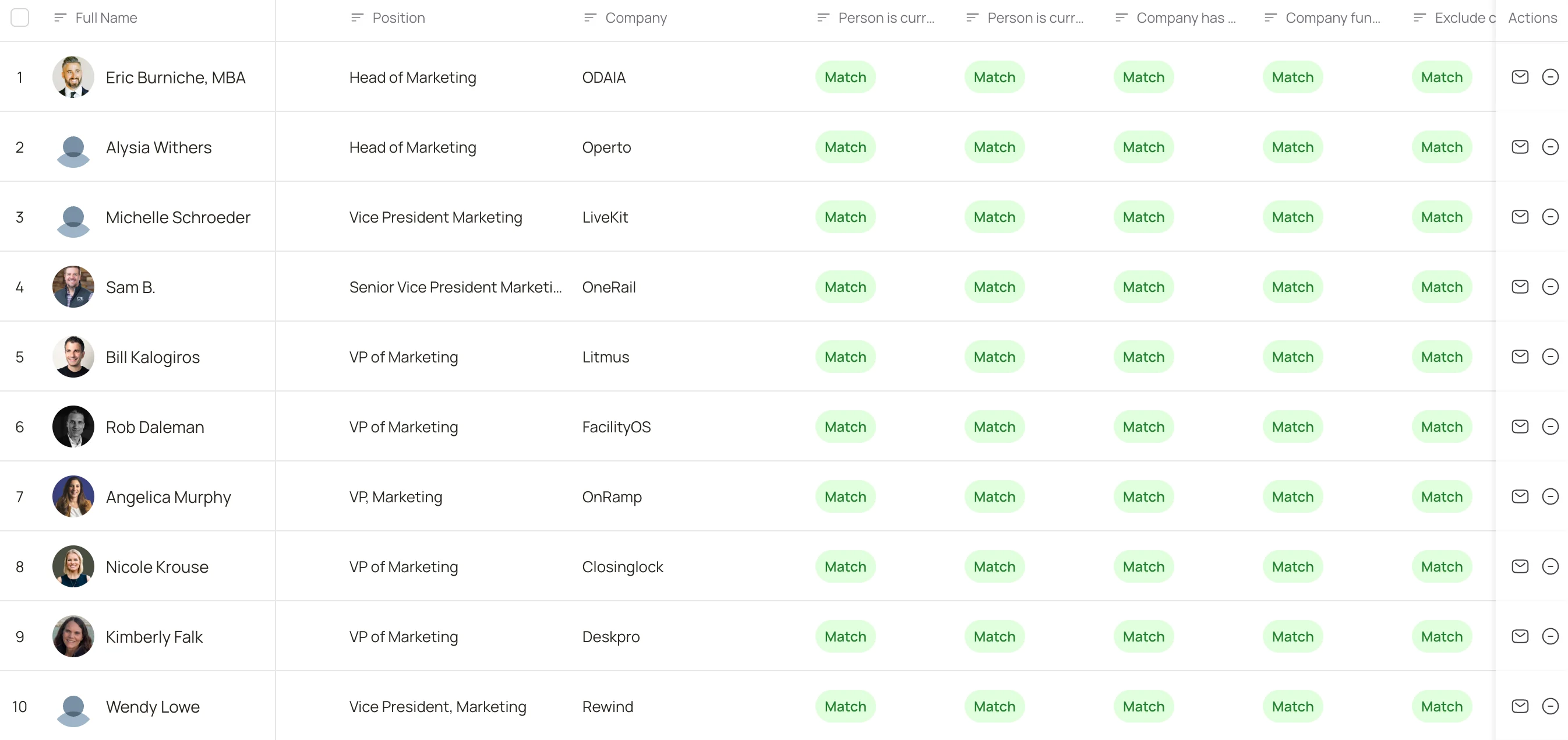
- Find the right people. Type a prompt such as: Find North American B2B SaaS companies with 50-200 employees, Series A to C, exclude consultancies and agencies, extract the VP Marketing's name, title, verified email, phone, and LinkedIn or X profile, then score each prospect from 1-10 on strategic fit, tech maturity, and reachability. Lev8 can run a sample first so you can confirm the output before a full run. The result is a structured table with verified data, scoring rationale, and company context without manual tool switching or API configuration.
- Write the right first email. Lev8 reads recent public activity, such as a LinkedIn post, hiring announcement, or blog article, then drafts the first email around those signals. High-priority targets can move into an outreach sequence.
- Wait for the right moment. Monitor prospects who have not replied for job changes, funding events, and tech-stack changes. When a signal fires, Lev8 can surface an alert with a new draft built around that event for review.
Who Should Switch to Lev8?
B2B SaaS Teams Running 3-5 Tools
You know the real cost of combining data, enrichment, sequencing, and intent products: the contracts, integration maintenance, and data lost in transit. Lev8 brings those tasks into one conversational workflow, reducing both the tool count and integration load.
Founders Without Dedicated RevOps
You may not have time to learn enrichment syntax or sequence configuration. Describe your ICP and let the agent handle the workflow. The tool adapts to the way you state the goal.
Teams Dependent on Timing Signals
If your outbound logic starts with a funding event, hiring change, or new technology, a static database is not enough. Lev8 combines live sourcing with signal monitoring so teams can act when the context is fresh.
Migrating from Lusha to Lev8: Three Weeks to a Full Switch
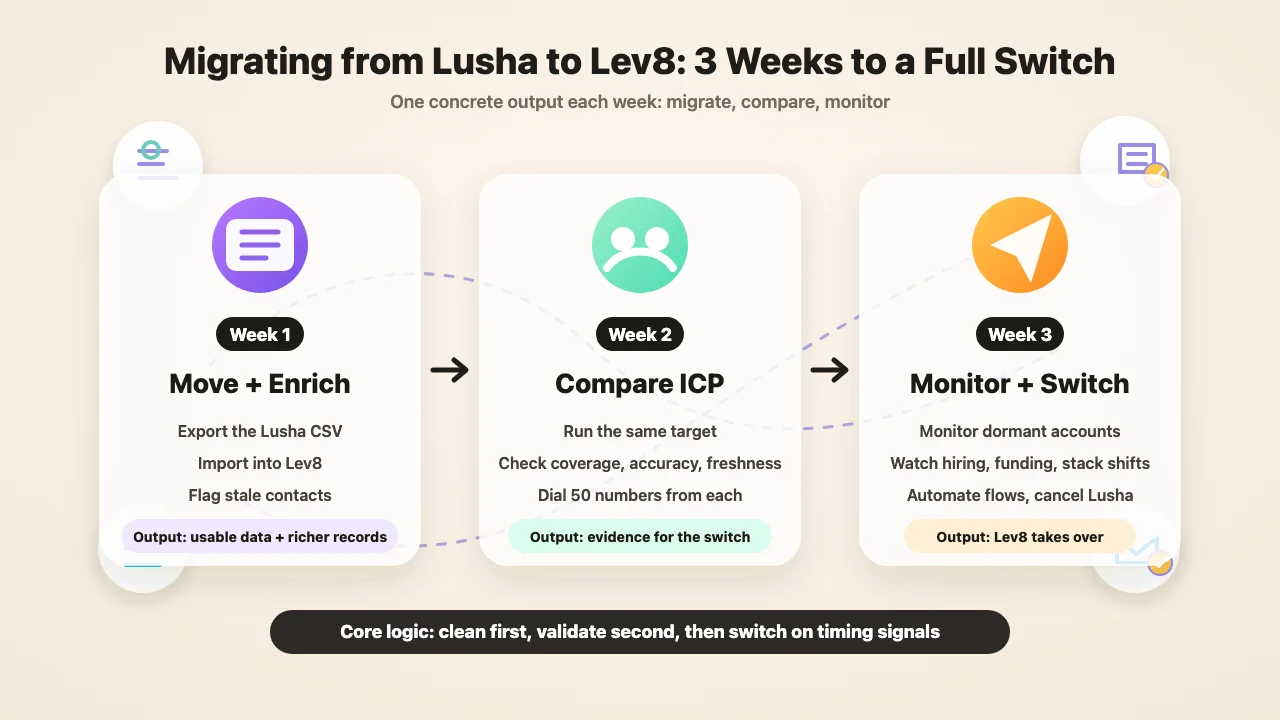
Migration is not just moving a list. A complete switch can run over three weeks, with each week producing something concrete.
Week 1: Move Your Existing Data and Validate It
The contacts you built in Lusha are an asset. Export the CSV, import it into Lev8, and run enrichment rather than throwing the list away.
For example, start with 2,000 VP-level contacts. After import, validate current roles and flag stale records. Then fill in useful company context such as tech stack, funding stage, traffic sources, and hiring activity. Given the estimated annual rate of contact-data decay, a meaningful portion of an older list may already need correction.
By the end of the week, you should have hard numbers: how much of the existing data still works, how much needs to go, and how much more complete each record becomes.
Week 2: Run the Same ICP on Both Platforms and Compare
Do not switch on a hunch. Run the same target on both sides. Search for North American B2B SaaS companies with 50-200 employees and a VP Sales in Lusha, then run the same brief as a prompt in Lev8.
Compare three things:
- Coverage: Which platform finds more relevant people for your actual ICP?
- Accuracy: Dial a representative sample of phone numbers from each side and log the connection rate.
- Freshness: Check what share of contacts changed jobs in the last three months.
By the end of the week, you have evidence. If the Lev8 list wins on the metrics that matter, the switch is backed by data instead of a guess.
Week 3: Set Up Monitoring and Make the Switch
Once the new data quality checks out, close with two moves.
First, load companies behind unresponsive contacts into Lev8's monitoring workflow and set triggers such as hiring surges, funding events, and tech-stack changes. Those contacts may not lack the need; you may simply have reached them at the wrong time.
Second, review which legacy subscriptions the validated Lev8 workflow actually replaces. Cancel only after contact discovery, enrichment, monitoring, personalized drafting, CRM handoff, and outbound workflows perform to your team's standards.
Lusha vs. Lev8: Lookup Tool or Full GTM Execution
In a direct Lusha vs. Lev8 comparison, the difference is structural, not a feature checklist. Clay is a flexible workflow builder. Apollo focuses heavily on sequencing and prospecting. ZoomInfo is known for a large B2B data footprint. 6sense focuses on intent and account intelligence. Each can serve a specific part of the stack.
Lev8's proposition is different: state the goal, then connect sourcing, verification, company intelligence, scoring, personalized drafting, multi-channel outreach, and monitoring in one workflow.
If you only look up one person's email now and then, the Lusha Chrome extension may remain the simpler option. But if you run a GTM team, own a pipeline number, and keep paying for fragmentation and stale data, evaluate the number of manual steps each platform leaves behind.
Lusha solves contact lookup. Lev8 is designed to cover the path from ICP definition to pipeline action.
Run your first prompt and see what the list looks like.