




Cold email is still a core channel for B2B sales and GTM teams, but outbound has changed. Buyers are harder to reach, sales cycles involve more decision-makers, and teams are under more pressure to use AI and better data to stand out, according to HubSpot’s 2026 State of Sales Report.
At the same time, poor email data has become more expensive. Google’s Email Sender Guidelines require senders to keep spam rates low, authenticate email properly, and avoid practices that lead to rejected or spam-foldered messages.
That means the best email finder tools in 2026 are not just tools that return an address. They help sales teams find the right person, verify email validity, reduce bounce risk, and fit into a real prospecting workflow.
Quick Picks by Use Case: Which Email Finder Should You Choose?
Multi-source prospecting: Lev8, Clay, Enrich
Best for teams that need to find contacts from multiple public sources and enrich them with verified emails. Lev8 supports LinkedIn, Google Search, YouTube, GitHub, Twitter/X, Instagram, and TikTok, making it useful when prospects do not come from one static database.
AI-powered outbound workflows: Lev8, Apollo, Snov.io
Best for GTM and SDR teams that want to connect email finding, verification, lead enrichment, scoring, and outreach. Lev8 is stronger for AI agent workflows, while Apollo and Snov.io are closer to traditional sales database and sequencing platforms.
Social audience and intent-based prospecting: Lev8, Wiza, Clay
Best for teams finding prospects from competitor followers, comments, GitHub contributors, YouTube comments, LinkedIn profiles, and other public intent signals. Lev8 is especially strong when the workflow starts from public signals rather than a company domain.
Domain-based email search: Hunter, RocketReach, Apollo
Best for users who already know the company domain and want to find work emails, email patterns, or specific contacts quickly. Hunter is the lightest option, while Apollo and RocketReach add broader contact database coverage.
Enterprise-scale email data and enrichment: Lev8, ZoomInfo, Enrich
Best for teams that need bulk email discovery, contact enrichment, CRM/API workflows, and ongoing lead scoring. ZoomInfo is strongest as an enterprise database, Enrich is more API-first, and Lev8 connects sourcing, email discovery, verification, and follow-up workflows.
How We Tested and Compared These Email Finder Tools
Test Dataset
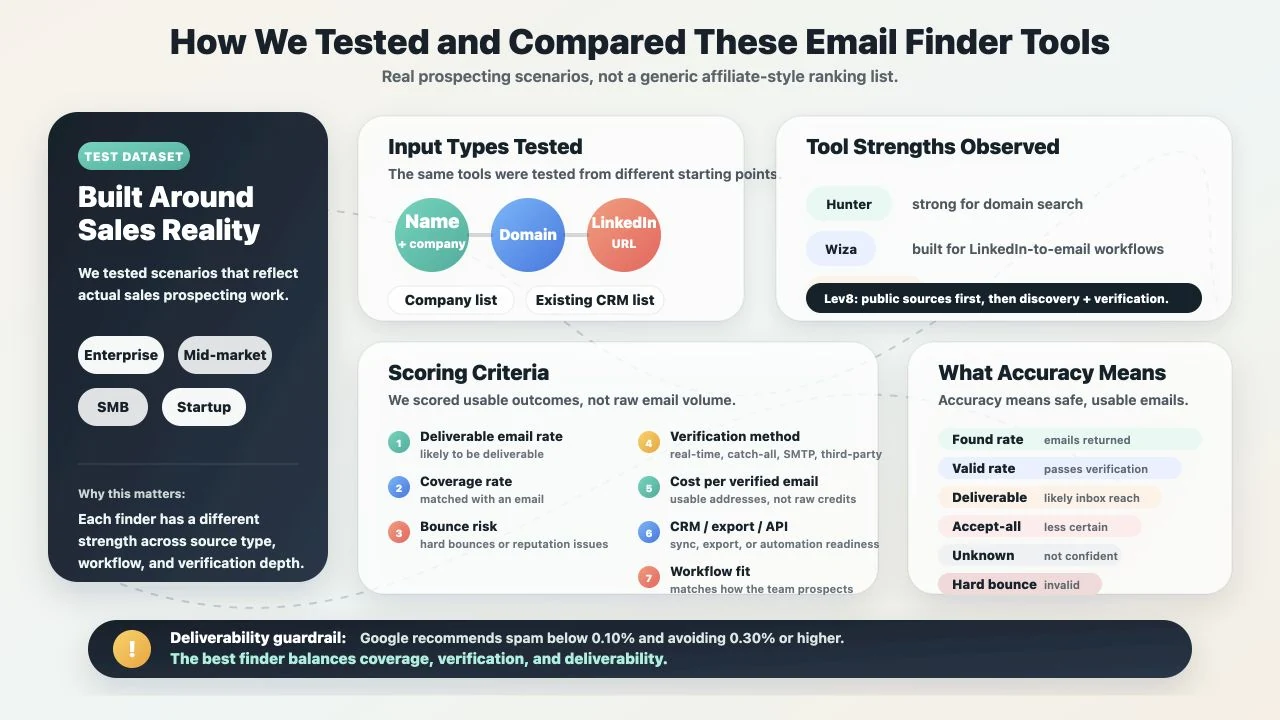
To avoid a generic affiliate-style list, we evaluated these tools using scenarios that reflect real sales prospecting.
The test dataset covered different company sizes, including enterprise, mid-market, SMB, and startup accounts.
We also considered multiple input types:
-
name + company
-
domain
-
LinkedIn URL
-
company list
-
existing CRM list
This matters because every email finder has a different strength. Hunter is strong for domain search, Wiza is built around LinkedIn-to-email workflows, Clay and Enrich work well for enrichment waterfalls, and Lev8 stands out when the workflow starts from multiple public sources before moving into email discovery and verification.
Scoring Criteria
We compared each tool using the following criteria:
-
Deliverable email rate: How many found emails are likely to be deliverable.
-
Coverage rate: How many target contacts the tool can match with an email.
-
Bounce risk: Whether the results may lead to hard bounces or sender reputation issues.
-
Verification method: Whether the tool supports real-time checks, catch-all detection, SMTP checks, or third-party verification.
-
Cost per verified email: The real cost of usable email addresses, not just raw credits.
-
CRM/export/API integration: Whether results can be exported, synced, or used in automated workflows.
-
Workflow fit: Whether the tool supports the way your team actually prospects.
What “Accuracy” Means in This Review
In this review, accuracy does not mean a marketing claim on a vendor page. It means the percentage of emails a sales team can actually use safely.
We separate several concepts:
-
Found rate: How many emails the tool returns.
-
Valid rate: How many returned emails pass verification.
-
Deliverable rate: How many emails are likely to reach the inbox.
-
Accept-all: A domain accepts all addresses, making verification less certain.
-
Unknown: The tool cannot confidently verify the email.
-
Hard bounce: The email is invalid and likely to bounce.
This distinction matters because deliverability rules are stricter now. Google recommends keeping user-reported spam rates below 0.10% and avoiding rates of 0.30% or higher; its Email Sender Guidelines FAQ also notes that non-compliant bulk senders can face temporary or permanent rejections.
A good email finder is not always the tool that returns the most addresses. The better tool is the one that balances coverage, verification, and deliverability.
1. Lev8 - Best Overall Email Finder for Cross-Platform Prospecting
Lev8 ranks first because it is not just a traditional email finder. It is closer to an AI-powered GTM workflow for teams that need to find the right contacts, enrich them, verify emails, and move into follow-up actions.
Lev8 supports email finding across LinkedIn, Google Search, YouTube, GitHub, Twitter/X, Instagram, and TikTok. Instead of limiting prospecting to a company domain or a static database, it helps teams start from public signals, social activity, company context, and ICP criteria.
For email-focused workflows, Lev8 connects email finding, email verification, lead enrichment, and AI prospecting. This allows teams to find ICP-matched contacts, enrich their profiles, verify email validity, and use the results for scoring or outreach.
Why Lev8 Stands Out
Lev8’s biggest advantage is multi-source email finding. Many email lookup tools require a known domain, a name, or a LinkedIn URL before they can return an email. Lev8 is stronger when the workflow starts earlier.
For example, a team can identify prospects from competitor social audiences, GitHub contributors, YouTube comments, hiring signals, funding signals, events, or technology stack clues. After that, Lev8 can move into contact enrichment, email discovery, and verification.
That matters because modern outbound teams are not just looking for any email. They need the right buyer, the right signal, and an email that is likely to be deliverable.
Best Use Cases
Lev8 is best for:
-
Finding prospects across multiple public platforms.
-
Mining competitor followers, comments, and public audience signals.
-
Finding companies based on technology stack, hiring, funding, or event signals.
-
Enriching existing contact lists with emails, job titles, companies, locations, and social profiles.
-
Connecting email discovery, verification, scoring, and follow-up in one workflow.
Pros
-
Supports 7 major public source categories.
-
Combines email discovery and verification with broader GTM workflows.
-
Useful for natural-language ICP prospecting.
-
Connects email finding with lead scoring and prioritization.
-
Better for ongoing outbound workflows than one-off email lookup.
Cons
-
If you only need to find emails from one company domain, Hunter may be faster.
-
Teams need a clear ICP or prospecting use case to get the most value.
-
Pricing should be checked on Lev8’s official product pages.
2. Hunter - Best for Domain-Based Email Finding
Hunter is one of the most recognizable email finder tools, especially for domain-based search. Its core products include Domain Search, Email Finder, Bulk Finder, and Email Verifier.
Hunter is simple, direct, and easy to adopt. Users can enter a company domain to find related work emails, or use a person’s name and company to search for a specific email address.
For founder-led sales, small teams, and lightweight prospecting, Hunter is a reliable choice.
Best Use Cases
Hunter is best for:
-
Finding emails from known company domains.
-
Identifying common company email patterns.
-
Running bulk domain searches.
-
Lightweight prospecting for small teams.
Pros
-
Clean interface and low learning curve.
-
Strong domain search.
-
Built-in email verifier.
-
Good for quick business email lookup.
Cons
-
Weaker for social signals and multi-source prospecting.
-
Coverage can be limited for small companies or less visible contacts.
-
Credit usage needs to be monitored at scale.
3. Apollo - Best for Large B2B Sales Teams
Apollo is more of a B2B sales database and engagement platform than a standalone email finder. It works well for SDR teams that need large-scale contact search, email reveal, CRM export, and outbound workflows in one place.
Apollo’s strength is its contact database. Users can filter by title, industry, company size, location, and other attributes, then access emails and other contact data.
Best Use Cases
Apollo is best for:
-
SDR teams that need large-scale B2B email discovery.
-
Teams with a defined ICP and field-based contact filters.
-
Companies that want sales database and engagement features together.
-
Teams that need CRM and sales workflow integrations.
Pros
-
Large B2B contact database.
-
Strong fit for sales teams doing outbound at scale.
-
Works with Chrome extension, CRM, and sequencing workflows.
-
Familiar workflow for SDR organizations.
Cons
-
Data accuracy varies by region, industry, and company size.
-
Credit systems can increase real usage cost.
-
High-risk outbound campaigns may still need extra verification.
4. Clay - Best for Email Finder Waterfalls
Clay is not just a single email finder. Its strength is letting teams build enrichment waterfalls with multiple data providers.
If the first provider cannot find an email, the workflow can try another provider, then another. This can improve coverage, especially for teams working with incomplete or messy lead lists.
Clay is a strong fit for RevOps teams, GTM engineers, and data-driven growth teams that want to build custom workflows.
Best Use Cases
Clay is best for:
-
Building custom email finder workflows.
-
Increasing coverage with enrichment waterfalls.
-
Enriching company lists or contact lists at scale.
-
Combining multiple APIs and data providers in one workflow.
Pros
-
Highly flexible waterfall setup.
-
Can combine many email finder and enrichment providers.
-
Strong fit for complex GTM data workflows.
-
Useful for technical growth teams.
Cons
-
Higher learning curve than Hunter or Snov.io.
-
Accuracy depends on provider selection and workflow design.
-
Cost management requires understanding actions and credits.
5. Enrich - Best for API-Based Email Enrichment
Enrich is a strong option for teams that need an API-first email finder and enrichment layer. It is well suited for internal systems, CRMs, automation workflows, and AI agents.
Its strength is structured data and automation. For teams that need to process contacts in bulk, find emails from name + domain inputs, or add email validation to internal workflows, Enrich is a practical choice.
Best Use Cases
Enrich is best for:
-
Connecting email finder capabilities to internal systems.
-
Enriching CRM or database records through API.
-
Providing structured data for automation workflows.
-
Teams that prefer clear credit-based usage.
Pros
-
API-friendly.
-
Email Finder and Email Validation can be used separately.
-
Good for bulk enrichment.
-
Strong fit for technical teams and automation use cases.
Cons
-
Less intuitive for non-technical users.
-
Better as a data layer than a full outbound platform.
-
Social sourcing may require additional tools.
6. Snov.io - Best Budget Email Finder with Verification
Snov.io is an all-in-one lead generation and outreach tool. Its core features include Email Finder, Email Verifier, Database Search, Chrome extension, and drip campaigns.
For smaller teams, its appeal is that email finding, verification, and basic outreach live in one platform. It may not be the strongest tool in every category, but it offers a broad feature set at a more accessible price point.
Best Use Cases
Snov.io is best for:
-
Small teams and agencies that need a budget email finder.
-
Teams that want finder, verifier, and drip campaigns together.
-
Users who need Chrome extension or bulk email search.
-
Teams that value feature coverage over deep customization.
Pros
-
Email Finder and Email Verifier in one platform.
-
Includes basic outreach and campaign tools.
-
Pricing is friendly for small and mid-sized teams.
-
Easy enough for most sales users to adopt.
Cons
-
Data accuracy can vary by use case.
-
The interface can feel busy because the platform includes many features.
-
Large campaigns still require careful bounce and deliverability monitoring.
7. RocketReach - Best for Broad Contact Lookup
RocketReach is useful for teams that need broad contact lookup across roles, companies, and industries. It is especially helpful when users want to search from LinkedIn, web pages, or a Chrome extension.
Compared with Hunter, RocketReach is more contact-search oriented. It is useful for sales, recruiting, PR, and business development teams that need emails and other contact details for specific people.
Best Use Cases
RocketReach is best for:
-
Sales, recruiting, PR, and BD teams finding specific contacts.
-
Users who already know the person’s name or LinkedIn profile.
-
Teams that want email, phone, and social contact details.
-
Users who need broader lookup than basic domain search.
Pros
-
Broad contact coverage.
-
Convenient Chrome extension and LinkedIn workflow.
-
Useful for person-level lookup.
-
Friendly for users outside traditional SDR teams.
Cons
-
Accuracy varies by region and role.
-
Phone data may be less reliable than email data.
-
Teams focused on deliverability should still verify emails separately.
8. ZoomInfo - Best Enterprise Email Database
ZoomInfo is an enterprise sales intelligence and GTM data platform. It is best for mature sales organizations with larger budgets and more complex data needs.
It is not the lightest email finder, but it is strong in enterprise account coverage, firmographics, intent signals, and CRM workflows. For large sales teams, ZoomInfo is more like a core sales database than a simple lookup tool.
Best Use Cases
ZoomInfo is best for:
-
Enterprise sales teams.
-
Large-scale B2B contact databases.
-
Firmographic, technographic, intent, and org chart data.
-
Organizations with mature CRM and sales operations systems.
Pros
-
Strong enterprise data coverage.
-
Good fit for account-based sales motions.
-
Can support prioritization with company and intent data.
-
Mature CRM and sales tool ecosystem.
Cons
-
Expensive for many small teams.
-
Data freshness still needs sampling and verification.
-
Coverage may drop for local businesses, non-US markets, or long-tail industries.
9. Wiza - Best for LinkedIn-to-Email Workflows
Wiza is built for teams that rely heavily on LinkedIn or Sales Navigator. Its typical workflow is simple: find prospects on LinkedIn, turn profiles into valid emails, and export the results to a CRM or sales tool.
If your prospecting mainly happens on LinkedIn, Wiza is a smooth option. If your leads come from GitHub, YouTube, X, Instagram, TikTok, or Google Search, a multi-source workflow like Lev8 will usually be a better fit.
Best Use Cases
Wiza is best for:
-
SDRs using LinkedIn Sales Navigator.
-
Sales and recruiting teams turning profiles into emails.
-
Teams connecting LinkedIn prospecting with email enrichment.
-
Users who want a simpler workflow than a custom waterfall.
Pros
-
Natural LinkedIn-to-email workflow.
-
Good fit for individual SDRs and small teams.
-
CRM integrations are useful for sales teams.
-
More efficient than manual LinkedIn export and lookup.
Cons
-
Strongly dependent on LinkedIn and Sales Navigator.
-
Not a complete multi-source prospecting tool.
-
Teams using non-LinkedIn sources may need additional finders.
10. Findymail - Best Accuracy-Focused Email Finder Layer
Findymail has a clear positioning: find fewer bad emails and reduce bounce risk. It is useful for teams that would rather get fewer results than fill campaigns with risky or invalid emails.
Findymail works as a standalone email finder, but it also fits well as a layer inside Clay-style enrichment waterfalls. Its main value is helping teams reduce risky or invalid addresses before outreach.
Best Use Cases
Findymail is best for:
-
Cold email teams that care deeply about bounce rate.
-
Teams that need an email finder layer inside a waterfall.
-
Users who want find-and-verify workflows.
-
Teams cleaning CRM data or maintaining contact data quality.
Pros
-
Focuses on verified results.
-
Strong fit for reducing bounce risk.
-
Useful inside enrichment waterfalls.
-
Good for teams that prioritize data quality.
Cons
-
Coverage may be lower than larger database tools.
-
Not ideal for teams that only want maximum contact volume.
-
Not a complete outbound suite.
How to Evaluate an Email Finder Tool
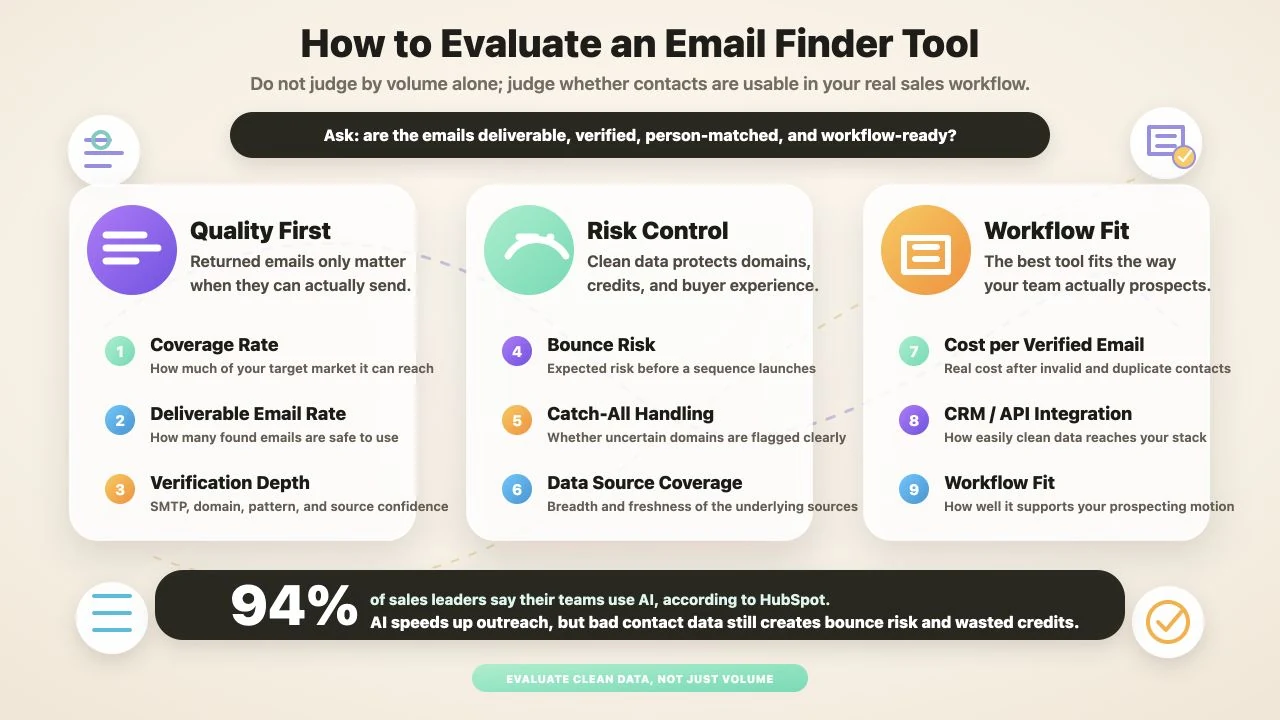
When choosing an email finder, do not only look at how many emails it returns. The better question is whether those emails are deliverable, verified, tied to the right person, and useful inside your actual prospecting workflow.
This is especially important as sales teams adopt more AI-assisted workflows. HubSpot reports that 94% of sales leaders say their teams use AI, which makes clean prospect data even more important: AI can speed up outreach, but bad contact data still creates bounce risk, wasted credits, and poor buyer experiences.
The most important evaluation metrics are coverage rate, deliverable email rate, verification depth, bounce risk, catch-all handling, data source coverage, cost per verified email, CRM/API integration, and workflow fit.
How to Choose the Best Email Finder Tool
If You Need Cross-Platform Email Finding
If your prospects come from LinkedIn, GitHub, YouTube, X, Instagram, TikTok, Google Search, or industry directories, start with Lev8.
Traditional email finder tools often require name + domain or a LinkedIn URL. Lev8 is stronger when your workflow starts earlier, with ICP criteria, public signals, social activity, or company-level intent.
With Lev8, teams can move from prospect discovery into email finding, email verification, and lead enrichment without switching between disconnected tools.
Recommended tools: Lev8, Clay, Enrich.
Best choice: Lev8.
If You Only Have Company Domains
If you already have a list of company domains and only need to find emails from those companies, Hunter is the most direct option. Its Domain Search and Email Finder are lightweight and easy to use.
Recommended tools: Hunter, RocketReach, Apollo.
Best choice: Hunter.
If You Need a Large Contact Database
If you need a large built-in contact database and already have SDRs, CRM processes, and sales engagement workflows, Apollo or ZoomInfo will be a better fit.
Apollo is stronger for mid-sized and large SDR teams. ZoomInfo is better for enterprise organizations with bigger budgets and more complex data operations.
Recommended tools: Apollo, ZoomInfo, RocketReach.
Best choice: Apollo or ZoomInfo.
If You Need Waterfall Enrichment
If your goal is to maximize coverage, consider Clay, Enrich, and Findymail. A waterfall tries one provider first, then another, then another, until it finds a verified email.
This approach can improve coverage, but it also adds cost and workflow complexity.
Recommended tools: Clay, Enrich, Findymail.
Best choice: Clay.
If You Need Email Finder + Verification + Workflow
If you need more than email lookup, Lev8 is the strongest option. It helps teams connect prospect discovery, email finding, verification, enrichment, scoring, and follow-up into one workflow.
Lev8 is especially useful when teams need AI prospecting, email finding, email verification, and lead enrichment together instead of using several disconnected tools.
Recommended tools: Lev8, Snov.io, Apollo.
Best choice: Lev8.